
For years, three problems sat at the center of React development, and for years the fixes were workarounds you maintained by hand. You wanted a tab that kept its state, so you reached for conditional rendering and watched the state vanish, or for a CSS display: none hack and paid for it in effects that never stopped running. You wrote a useEffect that needed the latest value of something, so you stuffed the dependency array, re-subscribed on every change, or quietly disabled the linter. You had a slow render and no idea which component was responsible, so you sprinkled useMemo and hoped.
React 19.2, stable since October 1, 2025, retires all three workarounds in one release. Activity hides UI without unmounting it. useEffectEvent reads the latest props and state inside an effect without making it re-run. And React Performance Tracks give you the scheduler and component traces that tell you where the time actually goes. This is the third React release in a year, after 19 in December and 19.1 in June, and the first to ship all three as stable, documented primitives rather than experiments.1
The release matters beyond the individual APIs, because one of them is already changing how the most popular React framework navigates. Next.js 16, with Cache Components enabled, wraps your routes in Activity so client-side navigation keeps the previous route's state instead of destroying it. This is not a feature you can ignore. It is the direction the framework is moving, and understanding the primitive under it tells you what breaks and what you need to reset. We covered that navigation model when Instant Navigations shipped, and this article is the layer underneath it.2
Activity: hiding without the state loss
The classic React way to show and hide part of a UI is conditional rendering, where a component renders only when a boolean is true. The problem is what happens when that boolean turns false. React unmounts the component entirely. Its state is gone: form inputs reset, scroll position jumps, an expanded section collapses, a half-typed draft vanishes. When the user navigates back, the component mounts again from scratch and the work is lost.
The conventional escape was to hide with CSS instead, by wrapping the content in an element whose display flips between block and none. That preserves the state, but it keeps the component alive and running. Effects stay subscribed, timers keep firing, an offscreen video keeps playing, and rendering work you no longer need still happens. You traded state loss for wasted cycles.3
Activity splits the difference. It gives you the state preservation of CSS hiding and the resource discipline of conditional rendering, and it does it with an explicit mode. You render an Activity component, pass a mode prop, and set it to either visible or hidden based on whether the content should show.
When the mode is hidden, React hides the children with display: none and keeps their state and DOM in place, but it unmounts their effects and defers any updates until React has nothing else to work on. When the mode flips back to visible, the effects mount again and updates process normally. The component never unmounts, so nothing resets. The cost of keeping it around is the DOM it holds, not the side effects that would otherwise burn cycles in the background.1
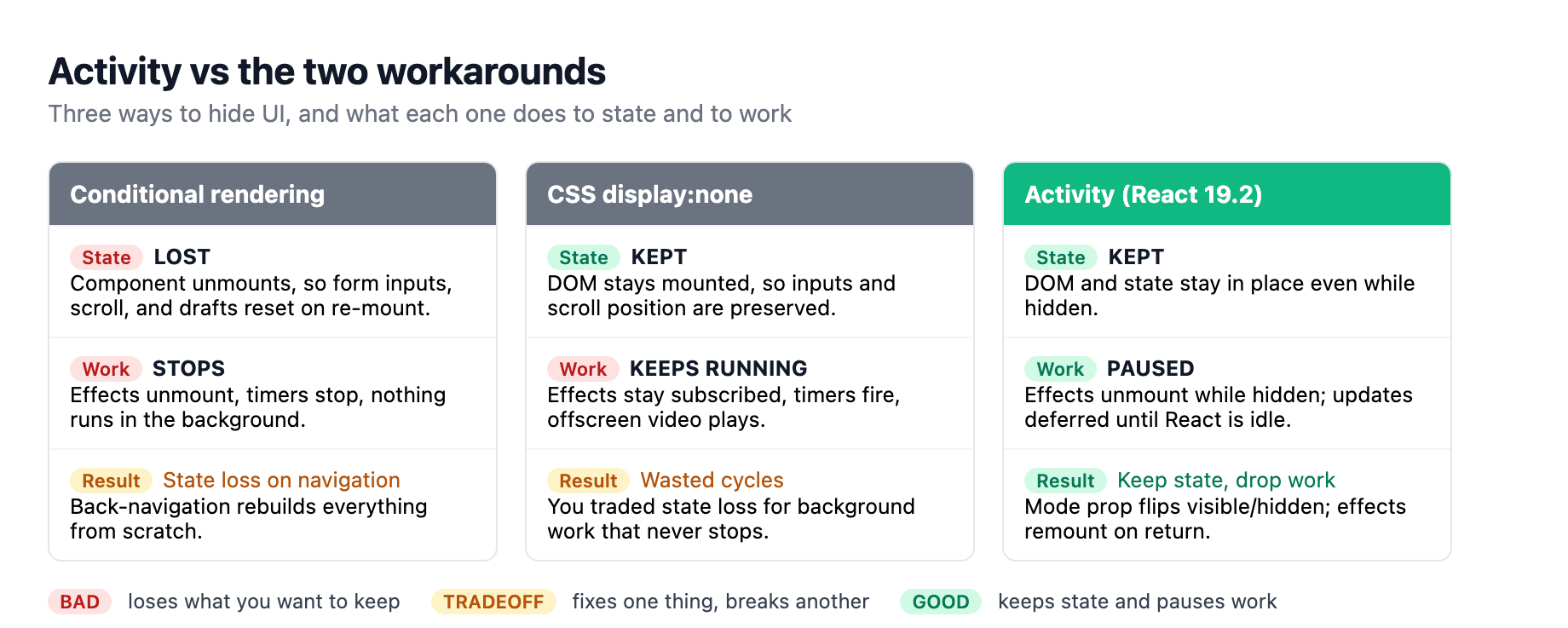
That combination is exactly what tabbed interfaces, modal stacks, wizards, and offscreen routes need. A tab you switch away from keeps its form draft and scroll position. A panel you hide for a while stops running its timers. A route you are likely to navigate to next can be rendered in the background at low priority, so when the user clicks it, the data is already loaded. Back-navigation restores the previous state instead of rebuilding it. This is the keep-the-state-drop-the-work primitive React did not have before, and teams have been building approximate versions of it with portals, external stores, and homegrown keep-alive components for years.
There is a caveat that matters when you adopt it. Because hidden boundaries preserve the DOM but clean up effects, anything with its own lifecycle needs explicit cleanup. A hidden video keeps playing unless your useLayoutEffect cleanup pauses it. A hidden subscription stays silent only because the effect that created it was unmounted; the underlying external resource may still be connected. The rule: if a component owns a side effect that should stop when it is not visible, put that stop in the effect's cleanup and verify it fires on the visibility change, not only on unmount.
useEffectEvent: reading the latest value without re-running
The second primitive fixes the dependency-array problem, one of the most common sources of subtle React bugs. Here is the classic shape. An effect connects to a chat room, and when the connection fires a connected event it shows a notification using the current theme. The effect depends on both the room id and the theme, and it opens the connection when either one changes.
The theme dependency is the bug. It has nothing to do with the connection logic; you only need its current value at the moment the event fires. But because it is read inside the effect, React treats it as a reason to re-run, so switching themes disconnects and reconnects the room. The usual fixes were all bad: leave theme out and suppress the linter, which stops it from catching real dependency mistakes later, or chase it with a ref updated by hand, which is boilerplate and invisible to the linter.4
useEffectEvent extracts the event-like part of the logic so it always sees the latest props and state without being a dependency. You wrap the notification call in a useEffectEvent and call that wrapped function from inside the effect, and the effect's dependency array now holds only the room id. The Effect Event reads the live theme at the moment it runs, but it is not reactive, so it never causes the effect to re-run, and the linter stays on.1
The hook is for functions that are conceptually events fired from an effect: notifications, analytics, logging, anything that needs the current value but should not re-synchronize when that value changes. It is not a blanket replacement for useCallback, which exists to memoize a function for performance. It is not a way to silence the linter; if you wrap something that genuinely is reactive in useEffectEvent, you hide a dependency that should re-run the effect. The constraints are strict and enforced by the linter: declare the Effect Event in the same component or hook as its effect, only call it from inside an effect, and never pass it around as a prop.4
To make this work, React 19.2 ships eslint-plugin-react-hooks v6, which knows about Effect Events and stops trying to insert them into dependency arrays. If you are on 19.2, upgrade the plugin to latest; the flat config is now the default, and the compiler-powered rules it enables (set-state-in-render, set-state-in-effect, immutability, refs during render) also prepare your code for the React Compiler, which we covered in our React Compiler deep-dive.
React Performance Tracks: where the time actually goes
The third primitive is not a component or a hook; it is a diagnostic. React 19.2 adds two custom tracks to the Chrome DevTools Performance panel that expose what React's scheduler is doing, replacing the guesswork of which component is making this slow.
The Scheduler track shows what React is working on by priority. You see blocking work from user interactions, transition work inside startTransition, Suspense work, and idle work, plus the phases each update goes through: render, commit, remaining effects. Critically, it shows when an update is blocked waiting on a higher-priority one, and when React yields to the browser before continuing. That tells you why a low-priority update feels delayed in a way flame charts of raw call stacks never did.1
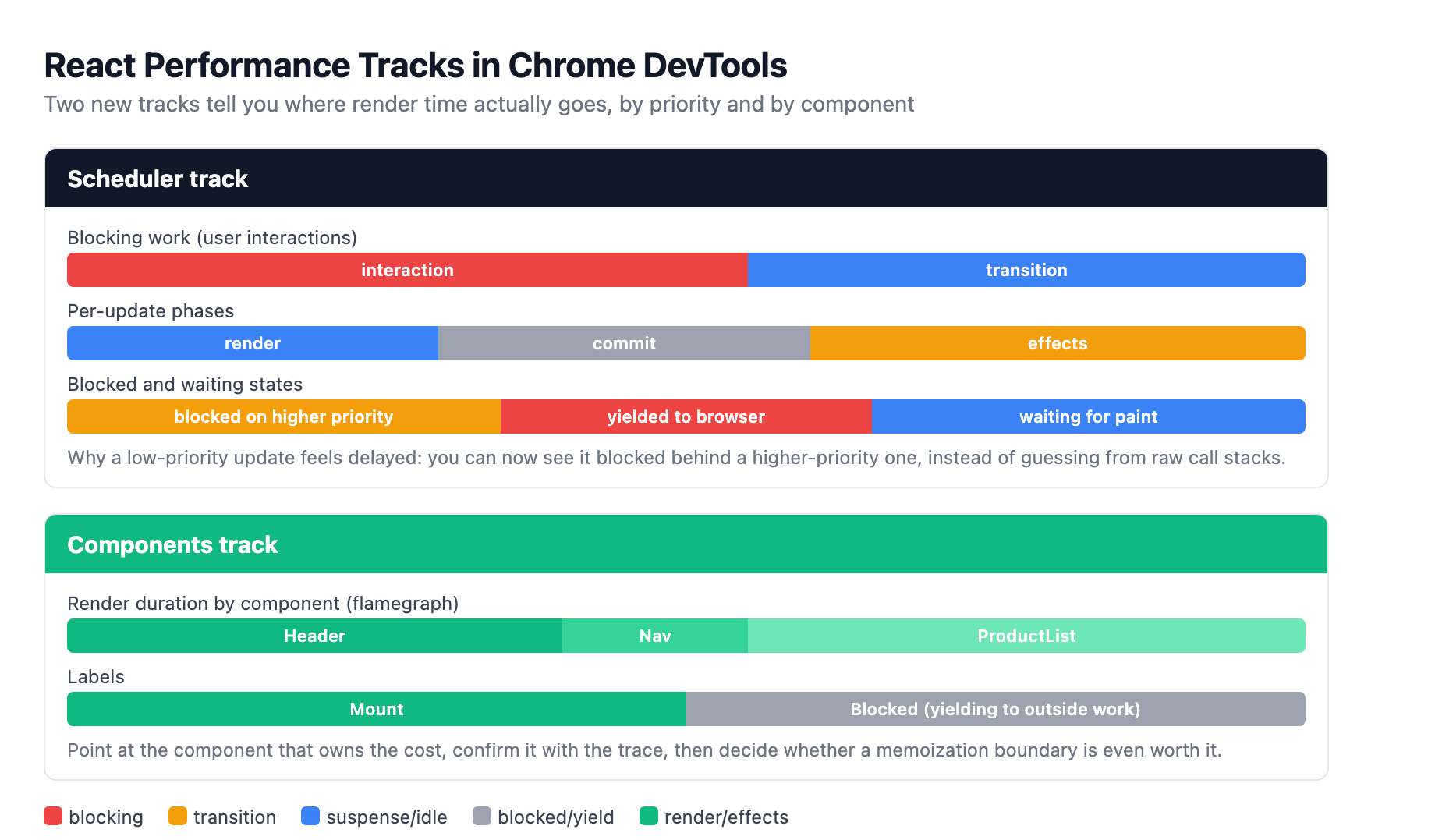
The Components track shows the tree of components React is rendering or running effects on, with labels like Mount and Blocked and a timing flamegraph. If a single component is chewing up render time, you see it directly instead of inferring it. This is the difference between profiling and measuring: you can point at the component that owns the cost, confirm the hypothesis with the trace, and only then reach for useMemo or a memoization boundary. It also pairs naturally with the React Compiler, which removes most manual memoization, so the tracks are the tool you use to find the residual hotspots the compiler does not fix.
React 19.2 has more in it. cacheSignal tells Server Components when a cache() lifetime has ended so you can abort a fetch or clean up work that will never be consumed. Partial Pre-rendering adds prerender and resume so you can pre-render the static shell, serve it from a CDN, and resume rendering the dynamic parts later. Suspense boundaries batch their reveals before first paint instead of peeling in one by one, and the default useId prefix changed to a value valid for view-transition-name, groundwork for View Transitions. These round the release out, but the three primitives above are the ones most teams will reach for first.15
What this means if you are on Next.js
The reason to care today, not at some future upgrade, is Next.js. With Cache Components enabled, Next.js 16 wraps each route in Activity. When you navigate from route A to route B, it does not unmount A; it sets A to hidden, preserving its state and DOM, and shows B. Navigating back restores A exactly as you left it: form drafts, scroll position, expanded details, video playback progress. The framework documentation is explicit that this is how client-side navigation works once Cache Components is on, and it is the same Activity primitive described above, applied at the route level.2
That convenience carries a responsibility. When routes stopped unmounting, code that relied on unmounting to clear state silently stopped clearing it. Dialogs that used to close on navigation now stay open. A form you submitted and navigated away from still holds its values and its useActionState result when you return. And, more seriously, state that persists across a route boundary can leak across users in a shared session: one person signs out and another signs in on the same tab, and the preserved state from the first user is still sitting in the hidden route. Next.js provides bfcacheId as a reset tool, a value you can use as a React key to reinitialize a whole subtree on a fresh navigation, and the framework docs tell you to audit anything that previously depended on unmounting to clean up.26
The practical adoption path is a migration, not a flip. Turn on Cache Components deliberately, and before you do, inventory the components that reset on navigation today. For each one, decide whether you want it reset and add the explicit reset, or preserved and add the cleanup for effects that should pause when hidden. The set of components you must touch is exactly the set that was silently relying on unmount to do your cleanup for you.
The honest read of React 19.2 is that the team stopped shipping clever abstractions and started dissolving the workarounds developers maintain by hand. If you are building tabs, modals, or multi-step flows, Activity is the replacement for your keep-alive hacks. If you are reading latest state inside an effect and either bloating dependencies or suppressing the linter, useEffectEvent is the correct tool. And before you add another useMemo, record a Performance Track and find out whether the component you are defending is even the slow one.
None of these are mandatory. You can keep your workarounds and they will keep working. But the direction is clear: Next.js already routes through Activity, the linter already understands Effect Events, and the DevTools already speak React's scheduler language. The workarounds are now the legacy path, and the primitives are the maintained one.
Sources
-
The React Team, "React 19.2," react.dev, October 1, 2025. react.dev ↩ ↩2 ↩3 ↩4 ↩5
-
"How Next.js preserves UI state with Activity," Next.js documentation. nextjs.org ↩ ↩2 ↩3
-
"React 19.2 is here: Activity API, useEffectEvent, and more," LogRocket Blog, October 13, 2025. logrocket.com ↩
-
"React useEffectEvent: Goodbye to stale closure headaches," LogRocket Blog, October 17, 2025. logrocket.com ↩ ↩2
-
Aurora Scharff, "What's New in React 19.2," certificates.dev, February 2, 2026. certificates.dev ↩
-
"Client component's state during route navigation," vercel/next.js discussion #85502, October 2025. github.com ↩