
The Summer '26 release started rolling out to production orgs on June 15, 2026. If your sandbox preview hasn't arrived yet, check your instance on Salesforce Trust. You've still got time to test, but the clock is ticking.
What follows isn't a laundry list of every new feature (there are hundreds). These are the three things that actually matter for teams managing multiple orgs, balancing client work, and trying to keep automation healthy at scale.
1. SOAP login() Is Retiring: Start Your OAuth Migration Now
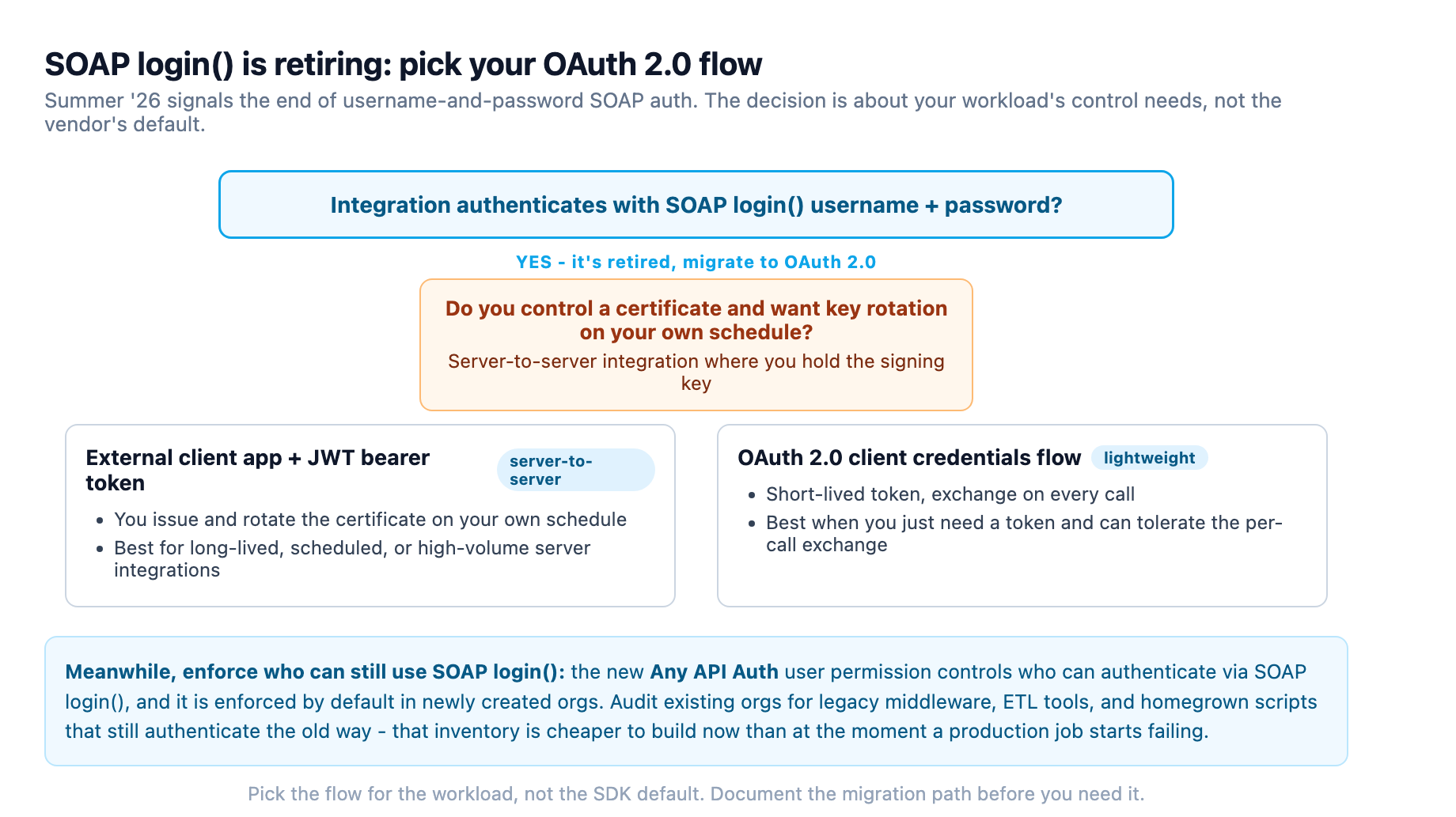
Here's the one that's easy to skip until it breaks: SOAP login() authentication is being retired. Any integration that authenticates with a username and password over the SOAP API needs to move to OAuth 2.0, specifically external client apps with JWT bearer tokens or the OAuth 2.0 client credentials flow.
A new Any API Auth user permission lets you control who can authenticate via SOAP login(), and it's enforced by default in newly created orgs. For existing orgs, you'll want to audit all connected apps and third-party integrations, especially legacy middleware, ETL tools, or homegrown scripts that authenticate the old way.
What to do this week: Check your list of authenticated integrations. If any use SOAP login with stored credentials, document the migration path. The retirement timeline hasn't locked in a hard cutoff date yet, but the Any API Auth permission going GA in Summer '26 is the signal to move.
When you do migrate, pick the right flow for the workload rather than defaulting to whatever the vendor's SDK exposes. External client apps with JWT bearer tokens suit server-to-server integrations where you control the certificate and want to rotate keys on your own schedule. The OAuth 2.0 client credentials flow is the lighter option when you just need a short-lived token and can tolerate the exchange on every call. Either way, the decision belongs in a written plan now, because the migration itself is rarely the hard part.
2. Flow Builder Just Got a Lot Stronger: Your Old Flows Need an Audit
Summer '26 shipped a half-dozen Flow enhancements that directly replace patterns your team probably built years ago. The argument for auditing your automation portfolio just got stronger.
Date Operators Cut the Formulas
Decision elements now support native date operators: "Is Today", "Is Tomorrow", "Is On", and even anniversary comparisons. No more DATEVALUE(CreatedDate) gymnastics for birthday reminders or renewal triggers. One note: this doesn't extend to DateTime fields yet.
Data Tables Finally Link to Records
The Data Table screen component can now show Lookup field record names as clickable links. This replaces the old hack of building custom URL formulas and navigation elements inside a Screen Flow. It was originally in the Spring '26 preview before being pulled late. Summer '26 ships it for real.
Transform Element Makes Loops 10× Faster
If you're still looping through collections to map fields and then doing a DML outside the loop, the Transform Element is your upgrade. According to Salesforce (and confirmed by Trailhead benchmarks), Transform performs up to 10× faster than the Loop + Assignment + DML pattern.
Collapse Fault Paths, Update Flows With Natural Language
Two quality-of-life wins: you can now collapse Fault Paths visually on the canvas (less clutter when debugging happy-path logic), and Agentforce can update Screen Flows with natural language prompts, the same capability that previously existed only for record-triggered and scheduled flows.
Radio Button Groups and Redesigned Validation Panel
Radio Button Group is a new component that replaces ugly browser-native radio buttons with a compact visual picker (think Visual Picker for radio buttons). The Validation Panel also got a redesign in Summer '26, surfacing errors and warnings more clearly on the canvas.
The actionable takeaway: If your org has flows that predate the Transform and Collection Filter elements, schedule a Summer '26 audit. Salesforce Ben's Tim Combridge published a guide just last week on exactly which hacks to replace with native features. The performance gains, especially from Transform over Loop patterns, are real enough that they pay back the audit time.
Don't try to rework the whole portfolio in one pass. Start with the flows that run most often or touch the most records, because those are where a tenfold reduction in processing time shows up as a measurable change in batch job duration and user-facing wait times. For each candidate, run a before-and-after benchmark in a sandbox on a representative data volume, not a handful of records. A flow that loops through a few hundred rows will never show the difference; a collection of ten thousand will. Keep the old version in place until the replacement clears your normal regression checks, and be explicit about what you are testing: no more subtle "it still does the same thing" assumptions. This is also the moment to look for the other quiet wins in the same release, because the native date operators and clickable Lookup links in Data Tables usually solve the same small annoyances in the same batch of flows, so you can fold them into one testing cycle.
3. The Agentforce Migration That's Not a Migration
Legacy agents can now be upgraded to the new Agentforce Builder with a few clicks. The migration preserves subagents, actions, system messages, and connections, automatically converting them to Agent Script. Your original agent stays untouched in the legacy builder as a fallback.
After migration, run the built-in optimization tool. It reviews natural language instructions and adds deterministic controls to boost reliability. For teams that have been experimenting with agents but haven't committed to the new builder yet, this removes the rebuild-cost objection.
Multi-Agent Orchestration Is Here (Beta)
The bigger story under this umbrella: Multi-Agent Orchestration, now in beta. You designate a primary "orchestrator" agent that routes work to specialized subagents behind the scenes. The user sees one conversation; the system coordinates across multiple agents. It sits alongside the wider July release picture we summed up in our state of the stack roundup.
Setup goes through Agent Builder: Explorer panel → + → "Connect Agent as Subagent (Beta)". Orchestrator agents using Agent Router route via @-referenced subagents defined in your Instructions.
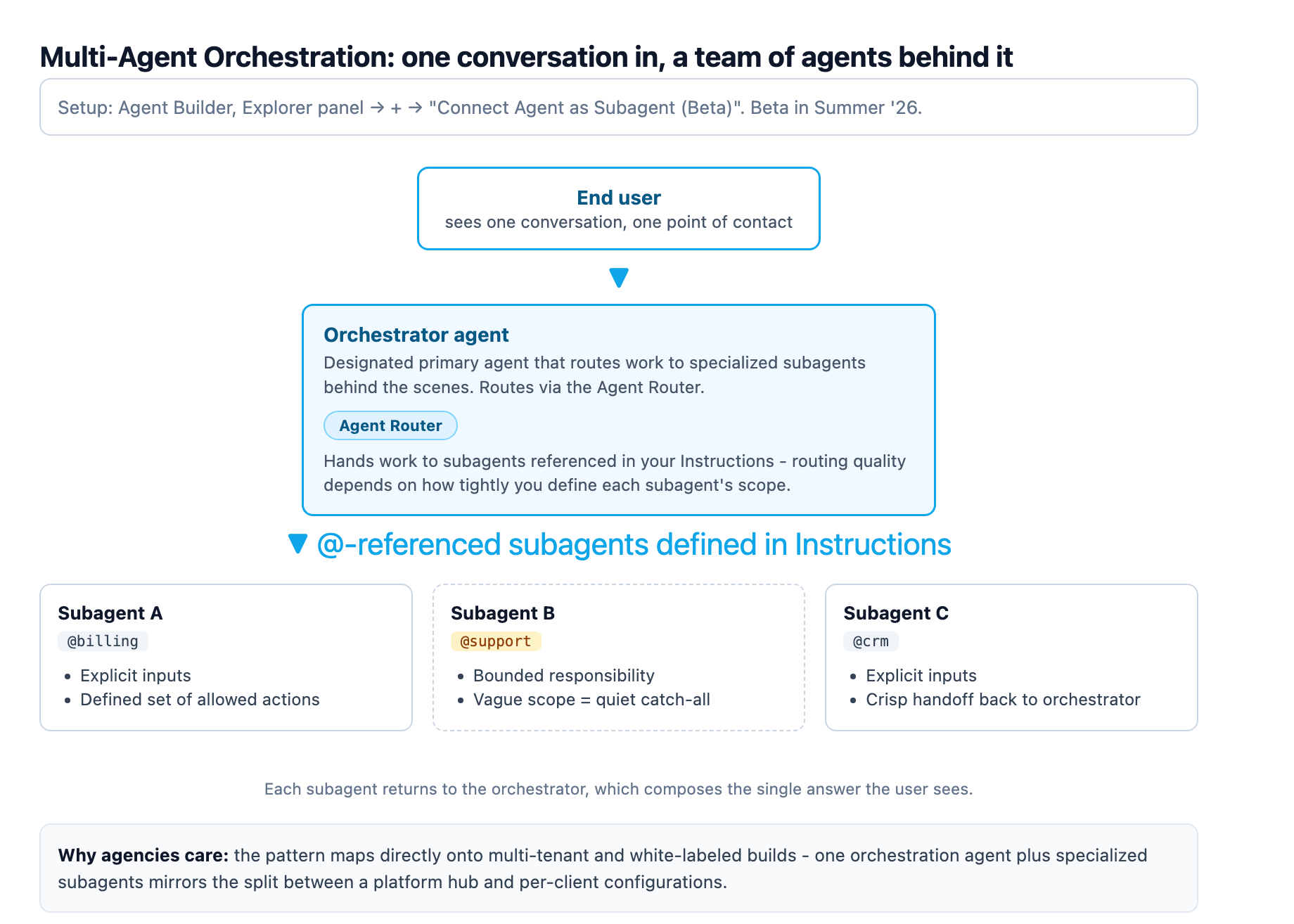
For agencies building multi-tenant or white-labeled Salesforce solutions, this is worth a proof-of-concept in sandbox now. The pattern, one orchestration agent plus specialized subagents, maps directly onto the split between a platform hub and per-client configurations.
The practical thing to test before you adopt it is the routing behavior, not just the build mechanics. Set up two subagents with clearly bounded responsibilities, give the orchestrator a few realistic requests that could plausibly land with either one, and watch where they go. Agent Router hands work to subagents referenced in the Instructions, so the quality of the routing is only as good as the boundaries you define in those instructions. A subagent with a vague job description will quietly become a catch-all, and then you are back to a single agent that happens to be wrapped in orchestration. Define each subagent's scope the way you would write a well-scoped integration contract, with explicit inputs, a defined set of actions it is allowed to take, and a crisp handoff back to the orchestrator. That discipline is the difference between a demo that routes cleanly and a production assistant that surprises you.
Setup With Agentforce Is Now GA
Setup with Agentforce, the AI-native setup assistant that answers questions and performs configuration tasks, went GA in Summer '26. All setup actions remain non-billable for now (no Agentforce credit consumption), though Data 360 credits are consumed for the Help and Navigation action. Salesforce plans to move this off Data 360 credits around Dreamforce 2026.
How We Handle Release Season at Adroit
We manage client orgs across multiple instances, which means Summer '26 hits different sandboxes on different dates. Our approach:
- Instance check first: confirm the rollout date on Salesforce Trust, not the calendar
- SOAP audit: flag every integration that uses basic auth. If it doesn't support OAuth 2.0, that's a client conversation
- Flow regression: run the Transform Element benchmark on at least one high-volume automation to validate performance claims in our clients' data shapes
- Agent upgrade path: for orgs already piloting agents, run the legacy upgrade and optimization tool; for orgs that aren't, document the Multi-Agent Orchestration beta as a Q3 2026 opportunity
This isn't a release where you can skip testing. The SOAP retirement, Flow performance changes, and Agentforce builder migration all have teeth. Test them in sandbox before August.
One more thing that matters across all three: talk to the people who will feel the change before you schedule it. The SOAP migration may touch a downstream reporting tool your client's finance team relies on every morning. The Flow rewrite changes timing on a process someone has built a routine around. The agent upgrade changes how a support team gets answers. None of that shows up in a technical checklist, but it determines whether the release lands as a smooth transition or a fire drill. Map the affected users, tell them what changes and when, and leave a rollback note in case a benchmark surprises you. Release season is manageable when the testing is grounded in real data shapes and the communication is handled before the code ships.
Sources
-
developer.salesforce.com. developer.salesforce.com ↩
-
salesforceben.com. salesforceben.com ↩ ↩2 ↩3 ↩4
-
salesforceben.com. salesforceben.com ↩
-
admin.salesforce.com. admin.salesforce.com ↩ ↩2 ↩3