Most production flow failures are design failures, not tool failures. Flow runs inside the same governor envelope as Apex: 100 SOQL queries, 150 DML statements, 50,000 records retrieved, 10,000 milliseconds of CPU per transaction, and exceeding any of them rolls back the whole transaction, fault paths or not 1. The org-level caps are real ceilings too: 50 versions per flow, 2,000 active flows per type 2. The five patterns below keep you inside that envelope as automation grows, and each has a point where you stop reaching for Flow and write Apex instead.
1. The Dispatcher
A dispatcher is one entry-point flow per object and trigger type, carrying nothing but entry conditions and a Decision that routes each record to a focused subflow. It exists because orgs start with one record-triggered flow per object, then ten business units add "one more thing" until it is a 40-element monolith nobody can touch. Salesforce calls this automation density: as automations on an object grow, so does the chance of re-entering the save order, exhausting CPU, and fragmenting logic across unpredictable execution order 3.
Build Case_AfterSave_Dispatcher with entry conditions like Status Is Changed, then a Decision routing to Case_Assign_Queue, Case_Notify_Owner, and Case_Update_SLA_Fields. Each handler is an autolaunched flow called through the Subflow element, which is what the docs recommend: small flows that perform common tasks, called from multiple parent flows 4. Set inputs and store outputs on the element, and use entry conditions aggressively; the decision guide treats precise entry conditions as the difference between performant multiple flows and orchestration risk 5.
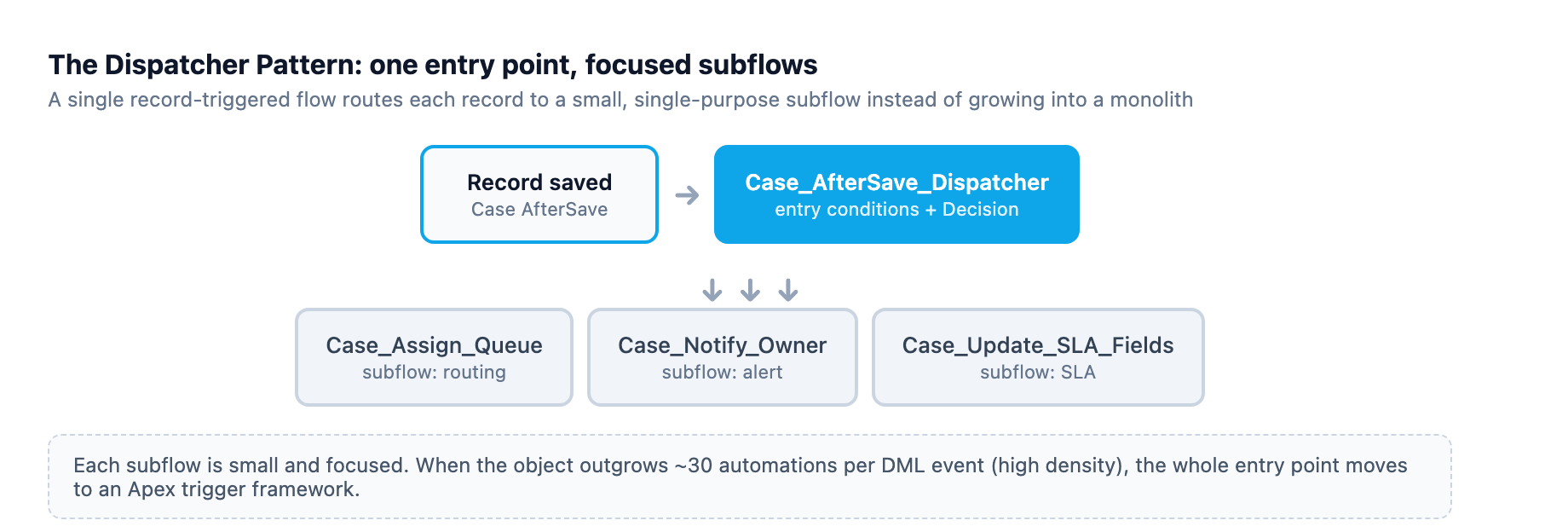
Skip the dispatcher when the object has one or two handlers; the decision guide sets the real upper bound: low-density objects stay in Flow, medium-density objects get Flow augmented with Invocable Apex, and high-density objects belong in Apex triggers 5. An object a nightly ERP sync pushes 200,000 records through is high density; no amount of subflow hygiene fixes that.
The pitfall is cyclic subflows. Subflow A calls subflow B, which calls A, and the runtime refuses to run the cycle, failing the transaction. The Flow Scanner flags this as CyclicSubflow at critical severity: the flow runtime does not allow circular references, and recursive logic belongs in Apex with explicit termination conditions 6.
2. The Collector
A naive flow processes records one at a time inside a Loop, every iteration firing a query or a DML statement. Run 200 records through a Data Loader import and it issues 200 SOQL queries, then dies at the 100-query ceiling and rolls everything back. The platform does bulkify across flow interviews in the same transaction, batching 100 interviews at the same element into one query or one DML statement 7. It will not consolidate a Create Records element inside a single flow's loop, which runs one DML per iteration 7.
Collect, then commit. For a scheduled flow, add one Get Records element with the batch filter into a record collection variable, loop with Assignment elements to set field values, then one Update Records element against the whole collection. The Flow Scanner's DbInLoop rule, high severity, prescribes this exact shape: one Get Records before the loop, in-loop assignments, and a bulk DML call after it using the IN operator 6. For an after-save flow touching only the triggering record, skip DML entirely: optimize for Fast Field Updates, which applies changes before save without a separate DML statement or save-order re-entry 5.
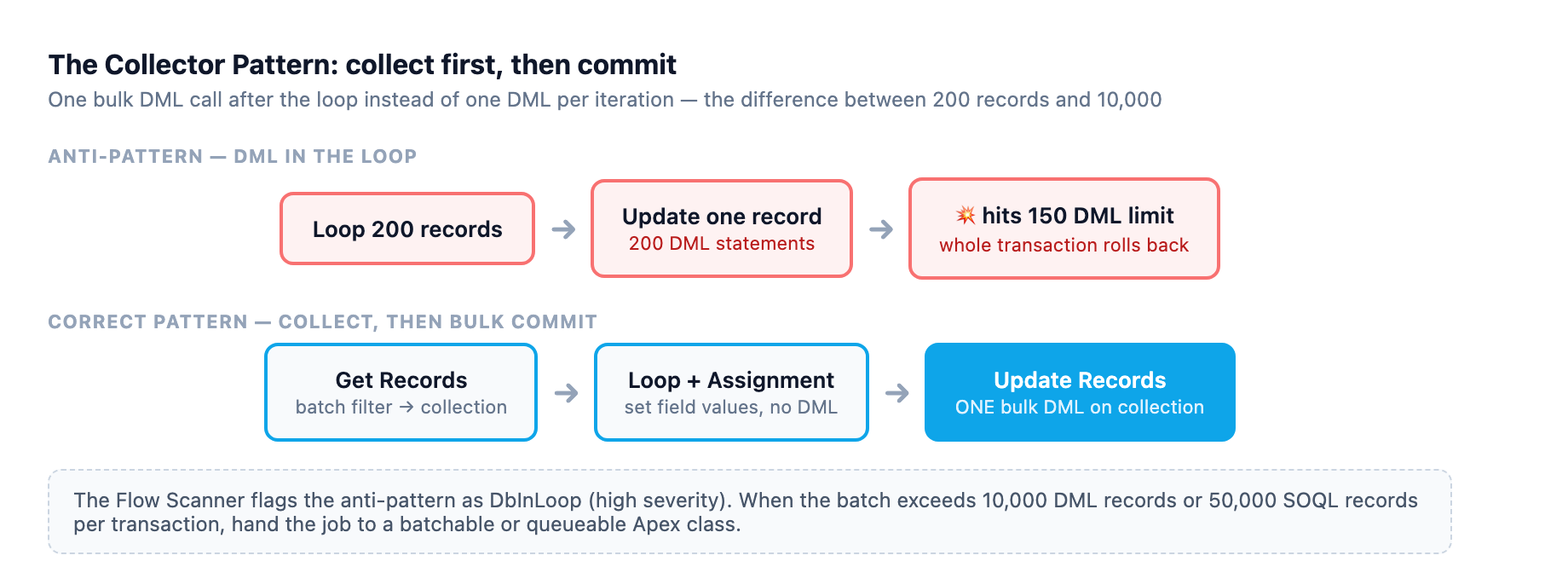
Call Apex when the batch outgrows the transaction: collections top out at 10,000 DML records or 50,000 retrieved records per transaction 1. Beyond that, use a batchable or queueable class, though async work triggered from flows carries its own error-handling and governor risk 5.
The pitfall is the missing-null check. A Get Records element can return zero records, and a null record variable in a loop fails silently, skipping records you assumed were processed. Put an Is Empty decision after any lookup whose results the flow depends on 8.
3. The Error Handler
Without fault handling, a failed Update Records element surfaces to the user as "An unhandled fault has occurred in this flow" and to you as an opaque failure 9. The Flow Scanner treats missing fault handlers as a high-severity violation, because an unhandled fault stops the flow with a generic error and no trace for an admin 6.
Add a fault path to every element that can fail (Get Records, Create/Update/Delete Records, actions, subflows) and route every path to one shared error-handling subflow. That subflow writes a record to a custom error log object, publishes a platform event for ops tooling, and emails when the failure is critical. Salesforce's best practice is that a failure should always reach a human, with the current values of the flow's resources in the message 10. Capture the error with the $Flow.FaultMessage global variable and log it beside the key variables 9. Platform events are the right alert channel: flows can publish and subscribe, and subscribers run on the event bus, not inside the failing transaction 11. Mind the hourly publishing allocation when sizing the alerting path 12.
Fault paths catch element-level faults, and that is the entire job. They cannot catch governor limit overruns: pushing the transaction past a limit rolls back the whole transaction even with a fault path defined, so the error-log record you just inserted rolls back with it 1. Defense against those failures is the Collector pattern and honest volume estimates, not error handling. Partial-failure semantics, one bad record not killing the batch, are Apex territory: a trigger or invocable method catches per-record exceptions and flows cannot.
The pitfall is the fault path that cannot save. When the running user lacks access to the error log object, or the log insert trips a validation rule, the error handler becomes a second failure inside the first. Run the log subflow in a context that can always write, scoped carefully, or you trade one generic error for another.
4. The State Machine
Business processes that move a record through defined stages, like a case from New to Working to Escalated to Closed, get implemented as flows that check "is the picklist this value?" and branch on ten other fields, so flows fire on every save, changed state or not.
Model the lifecycle as a state machine: the state is a picklist field, and each transition is a record-triggered flow gated by an entry condition. The Trailhead pattern for flow-driven tiering shows the mechanics: the Is Changed operator and values pulled from configuration instead of hardcoded 13. Create Case_Transition_To_Escalated with entry conditions like Status Equals Escalated and Previous Status Equals Working, ($Record__Prior holds the prior value), and set Fast Field Updates when the transition only updates the same record. Use Flow Trigger Explorer or the Set Trigger Order feature from Spring '22 to sequence the flows that legitimately run on the same save 14. Record-triggered flows have documented before- and after-save considerations; review them before wiring transitions 15.
Move to Apex when the machine gets big: more than a handful of transitions, transitions that must be atomic, or a state change that means different things depending on role or timing. The decision guide's one-entry-point rule applies too, so if the object already has a trigger, transition logic belongs in the trigger handler, not in a competing flow 5.
The pitfall is self-retriggering. A transition flow that updates the status field re-enters the save order and can fire itself again, spinning until it burns the duplicate-updates allowance or times out on CPU. Trace your flow's own writes against the order-of-execution diagram before activating 16. Before-save optimization is the standard defense; it avoids the extra DML and the re-entry 5.
5. The Flow Template
Every new region, product line, or business unit that needs "the same but different" automation gets a clone of an existing flow with values swapped in. Ten clones later, a fix must be applied ten times, and three are subtly wrong. Hardcoded IDs and values are the root cause; the Flow Scanner flags them because they differ between sandbox and production and break on deploy 6. If you are still deciding whether Flow or Apex should carry the automation in the first place, our Flow vs Apex decision framework is the companion to these patterns.
One flow, configured by data. Replace hardcoded values with lookups into a Custom Metadata Type (CMT) record, so the same flow behaves differently per region or record type based on which config record it reads. Custom metadata is deployable, so config travels through the same change set as the flow itself. The scanner's HardcodedId guidance points the same way: store configuration in custom metadata and query by DeveloperName, which stays consistent across orgs 6.
Create the CMT, say Case_Assignment_Rule__mdt with fields for queue, record type, and department. Add a Get Records element against the CMT object filtered by DeveloperName, as the Trailhead unit demonstrates, then reference those values in Assignments and decisions 13. The admin blog's record-type-to-queue example shows the payoff: a per-record-type decision tree collapses into a two-element flow reading a config table 8.
Configuration that is really user data belongs in a custom object so support can edit it without a deployment. When the variance is behavioral rather than value-based, a config table does not help; per-variant logic in Flow means clones, which means an invocable Apex method or a trigger handler instead. The admin guidance is to keep flows declarative until the logic outgrows them, then hand the heavy lifting to bulk-safe Apex marked with @InvocableMethod 14.
The pitfall is config that outruns its deploy. The CMT record and the flow that reads it travel separately, and a flow activated before its config reaches production fails on first run. Deploy them together, and add a decision after the Get Records to handle the no-config-found case with a loud error instead of silent misbehavior, the same empty-result check every pattern uses 8.
The review before you activate
Run the Flow Scanner against the flow metadata before anything goes live; it surfaces missing fault handlers, database operations in loops, hardcoded IDs, and cyclic subflows 6. Test in a sandbox at realistic volume; a flow that handles 50 records fine and dies on 5,000 is not ready for production 14.
Sources
-
Per-Transaction Flow Limits. help.salesforce.com ↩ ↩2 ↩3
-
General Flow Limits. help.salesforce.com ↩
-
Record-Triggered Automation: Apex or Flow?. salesforce.com ↩
-
Subflow Element. help.salesforce.com ↩
-
Record-Triggered Automation Decision Guide. architect.salesforce.com ↩ ↩2 ↩3 ↩4 ↩5 ↩6
-
Flow Scanner Rules Reference. developer.salesforce.com ↩ ↩2 ↩3 ↩4 ↩5 ↩6
-
Flow Bulkification in Transactions. help.salesforce.com ↩ ↩2
-
The Ultimate Guide to Flow Best Practices and Standards. admin.salesforce.com ↩ ↩2 ↩3
-
Handle Flow Errors with Fault Paths. trailhead.salesforce.com ↩ ↩2
-
Configure Every Fault Path to Send You an Email. help.salesforce.com ↩
-
Platform Events Developer Guide. developer.salesforce.com ↩
-
Platform Event Allocations. developer.salesforce.com ↩
-
Use Custom Metadata Types in Flows. trailhead.salesforce.com ↩ ↩2
-
Planning for Flow Success: Building Automation That Scales. admin.salesforce.com ↩ ↩2 ↩3
-
Flow Feature Considerations. help.salesforce.com ↩
-
Order of Execution Flowchart. developer.salesforce.com ↩