
After seven years of slow, steady improvement, web accessibility went backwards. The 2026 WebAIM Million, an automated audit of the top one million home pages, found that 95.9% of them had detectable WCAG 2 A/AA failures, up from 94.8% in 20251. Average detected errors per page climbed from 51 to 56.1, a 10.1% jump in a single year1. The report is blunt about the likely driver: home pages are bigger and more complex than ever, and much of that new code is being written by AI-assisted and automated workflows that do not carry accessibility habits forward2.
This matters to a delivery team because it is the opposite of what most teams assume. The common assumption is that accessibility is mostly solved if you run an automated scan and it comes back clean. The 2026 numbers say otherwise. The scan that produced those failure rates is itself automated, and it is detecting failures on sites that have been through plenty of automated checks.
This article is a grounded look at what rule engines like axe and WAVE genuinely catch, where they stop, and the layered test stack that keeps accessibility from silently rotting between manual audits. The audience is engineers and design-system owners who want a testing strategy they can actually ship, not another compliance lecture.
The two numbers that explain the whole debate
Discussions about accessibility testing keep colliding because two different claims get conflated. One is about the share of WCAG success criteria a rule engine can evaluate on its own. The other is about the share of real-world errors it catches. Both are true, and they point in opposite directions.
On criteria coverage, the honest figure is modest. The common industry estimate is that automated tools catch roughly a third of accessibility issues on their own, and most of the remainder needs a human34. Deque, the company behind axe-core, studied its own tools and reported they identify on average about 57% of accessibility issues across real applications, a best case for a mature engine rather than a typical floor5. Either way, a meaningful slice of WCAG is simply not machine-checkable: whether alternative text means the right thing, whether focus moves in a logical order, whether a custom widget behaves the way a screen-reader user expects.
On real-world errors, the picture inverts. Most of the failures that actually show up on production sites cluster in a small set of categories that rule engines are very good at detecting. WebAIM found that 96% of all detected errors fall into just six types: low-contrast text on 83.9% of pages, missing image alternative text on 53.1%, missing form labels on 51%, empty links on 46.3%, empty buttons on 30.6%, and a missing page language attribute on 13.5%1.
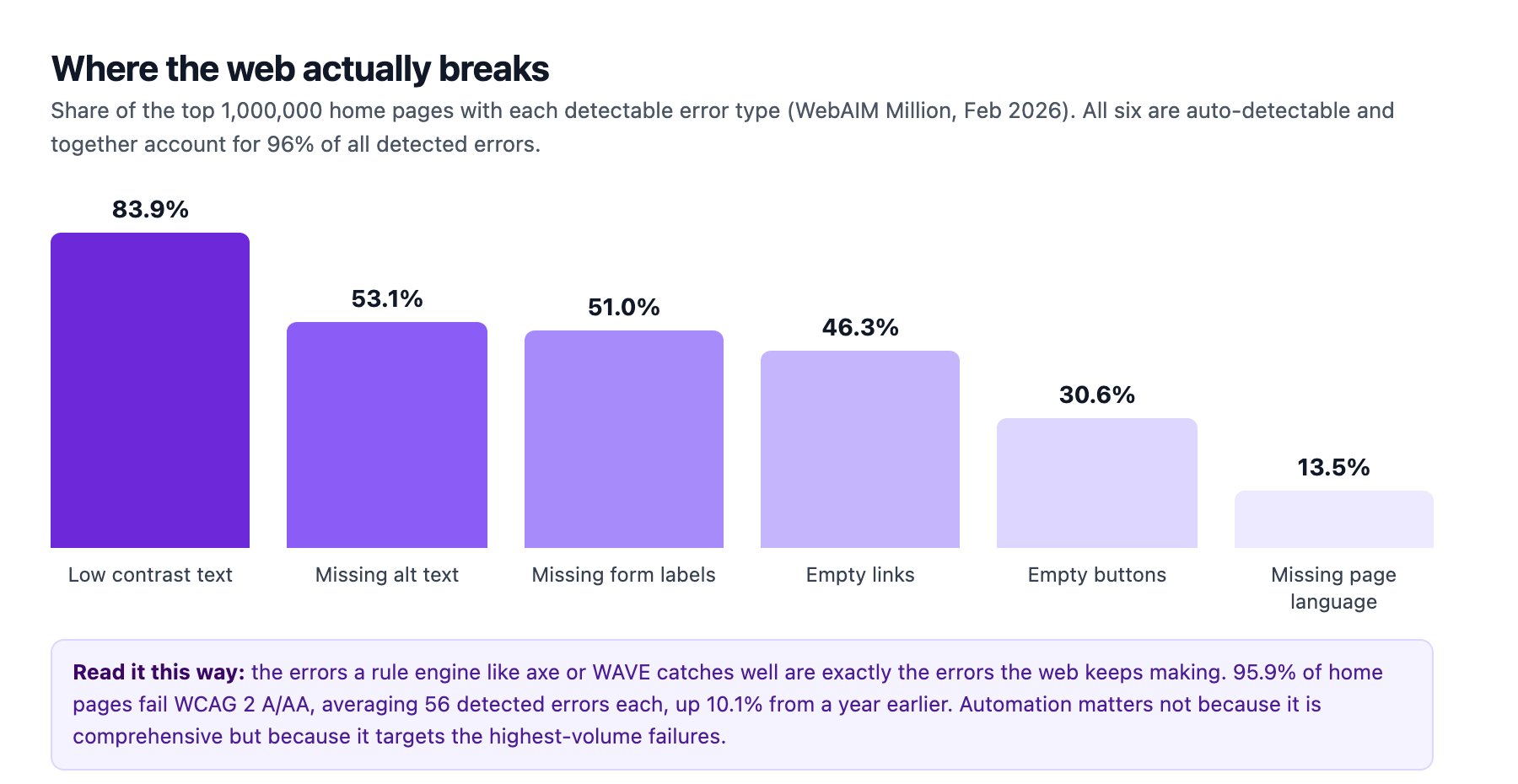
So the honest framing is not "automation is useless." It is that automation targets exactly the high-volume failures the web keeps repeating, while leaving the judgment-heavy criteria to people. The strategy is to run the automatable net constantly so the volume problems never come back, and to spend limited human review time on the criteria only a person can assess. Teams that treat a green automated scan as a finished accessibility job are skipping the second half.
Where the rule engine stops
The most useful thing you can do with axe-core, the engine that powers most commercial accessibility tooling, is understand precisely what it can and cannot decide6. It ships rules for structure: missing alt text, form inputs without labels, empty links and buttons, insufficient color contrast, invalid ARIA, duplicate IDs, and skipped heading levels3. It is engineered to avoid false positives on the rules it ships, which is why it is trusted as a hard gate in CI6.
None of those rules require judgment about meaning. That is the whole point of a machine-checkable rule. The moment the check needs an understanding of what content is for, the engine stops being reliable.
Take alternative text. A rule engine can confirm an image element has an alt attribute present. It cannot tell you that alt="image", which WebAIM flags as questionable on 10.8% of images that have alt text, communicates nothing to a screen-reader user1. Color contrast is another good example: axe can measure the ratio between a text color and its background and fail anything under the WCAG AA threshold, which is genuinely useful. It cannot weigh whether a low-contrast label sits next to a high-contrast one and visually misleads a sighted user with low vision, because that judgment is about adjacent context rather than a single computed ratio.
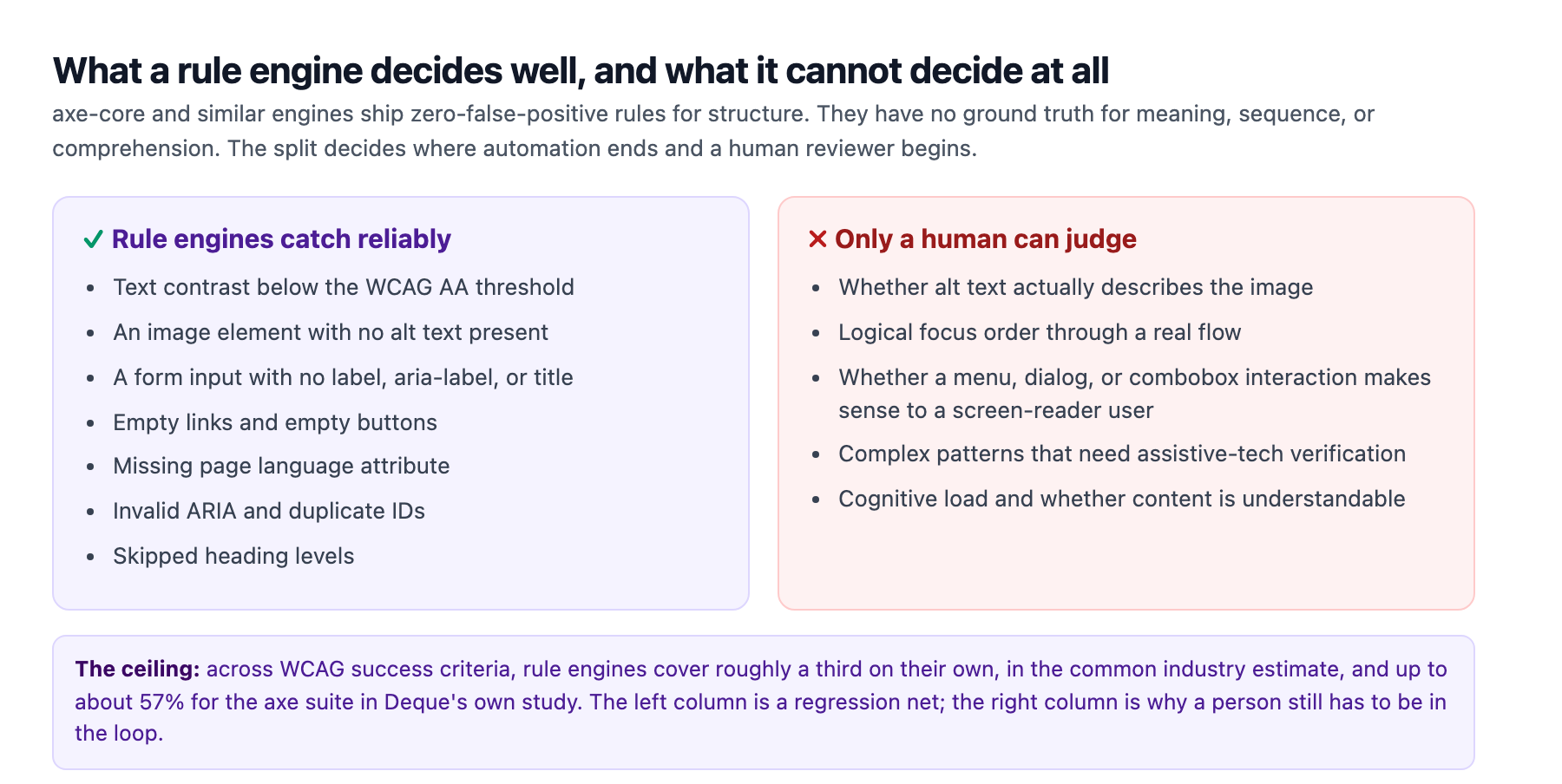
The boundary matters operationally because it tells you where to put human effort. A team that reserves its screen-reader and expert review time for focus order, meaningful descriptions, and complex interaction patterns is spending its limited capacity where the engine cannot follow. A team that uses an automated scan as the whole accessibility program is measuring the third it can measure and calling the job done.
The layered test stack
Because no single tool covers all of it, the realistic approach is a stack of checks that run at different points in the pipeline, with the cheap automatic ones running constantly and the judgment-heavy ones running on a deliberate cadence. Accessibility professionals describe this as a pyramid or a stack, and the rough split matters less than the ordering3.
At the bottom, cheapest and most frequent, sits static analysis and component-level unit testing. eslint-plugin-jsx-a11y flags problems like a click handler on a non-interactive element, missing alt text, or inputs without labels at write time, in the IDE, before code is even committed3. Alongside it, a unit test that renders each component and runs axe over the DOM, using jest-axe or vitest-axe, catches structural issues on every commit. This is the layer that runs most often and costs the least, and it is where the design-system team has the most leverage, because one accessible component is reused in a thousand places.
Above that sits integration and end-to-end testing with axe driven through a real browser. The value of this layer is that it can test states a load-time scan never reaches: a dialog after it opens, a form after a failed submit, a page in dark mode where a token that passed contrast in light mode now fails it (the contrast audit genuinely has to run twice, a point our dark-mode accessibility guide makes in detail). The standard wiring is @axe-core/playwright for Playwright or cypress-axe for Cypress, run over your critical user journeys and every visible state, plus the Storybook addon-a11y addon that scans each component story in isolation36.
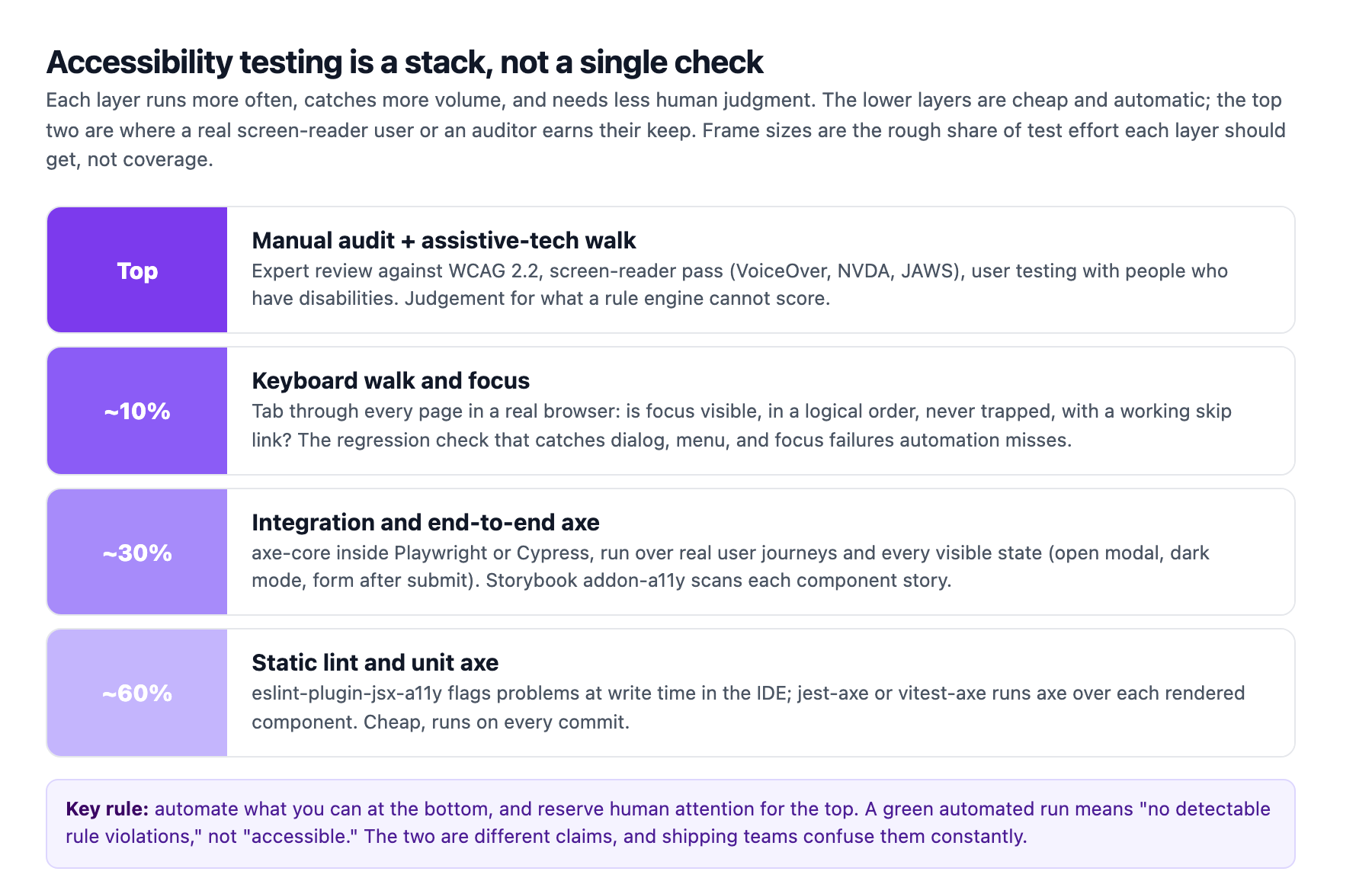
The layer that most teams skip entirely is a keyboard walk. This is not an automated scan; it is a person tabbing through every page in a real browser and answering a handful of questions. Is focus visible at every step? Does it move in a logical order? Is it ever trapped inside an open dialog? Does a skip link get the user past the navigation? The gap between automated tools and this walk is surprisingly large. In one published benchmark across five public sites, axe-core alone found 38 of 204 issues actually required under WCAG 2.1 AA, and the keyboard-walk layer caught the other 166: elements unreachable by keyboard, no visible focus indicator, focus traps, illogical focus order, and missing skip links4. Automation found under a fifth of the AA-required problems on those sites, not because axe is weak but because keyboard operability is exactly the kind of thing a rule engine cannot fully model.
At the very top sits the manual audit and assistive-technology pass: an expert reviewer working against the WCAG 2.2 success criteria, a screen-reader pass with VoiceOver, NVDA, or JAWS, and, where budget allows, moderated testing with people who actually use assistive technology. This is the layer that catches the cognitive and comprehension failures no engine can score3. It is expensive, which is exactly why it belongs at the low-frequency top of the stack and not as the only check.
Wiring it into CI as a regression gate
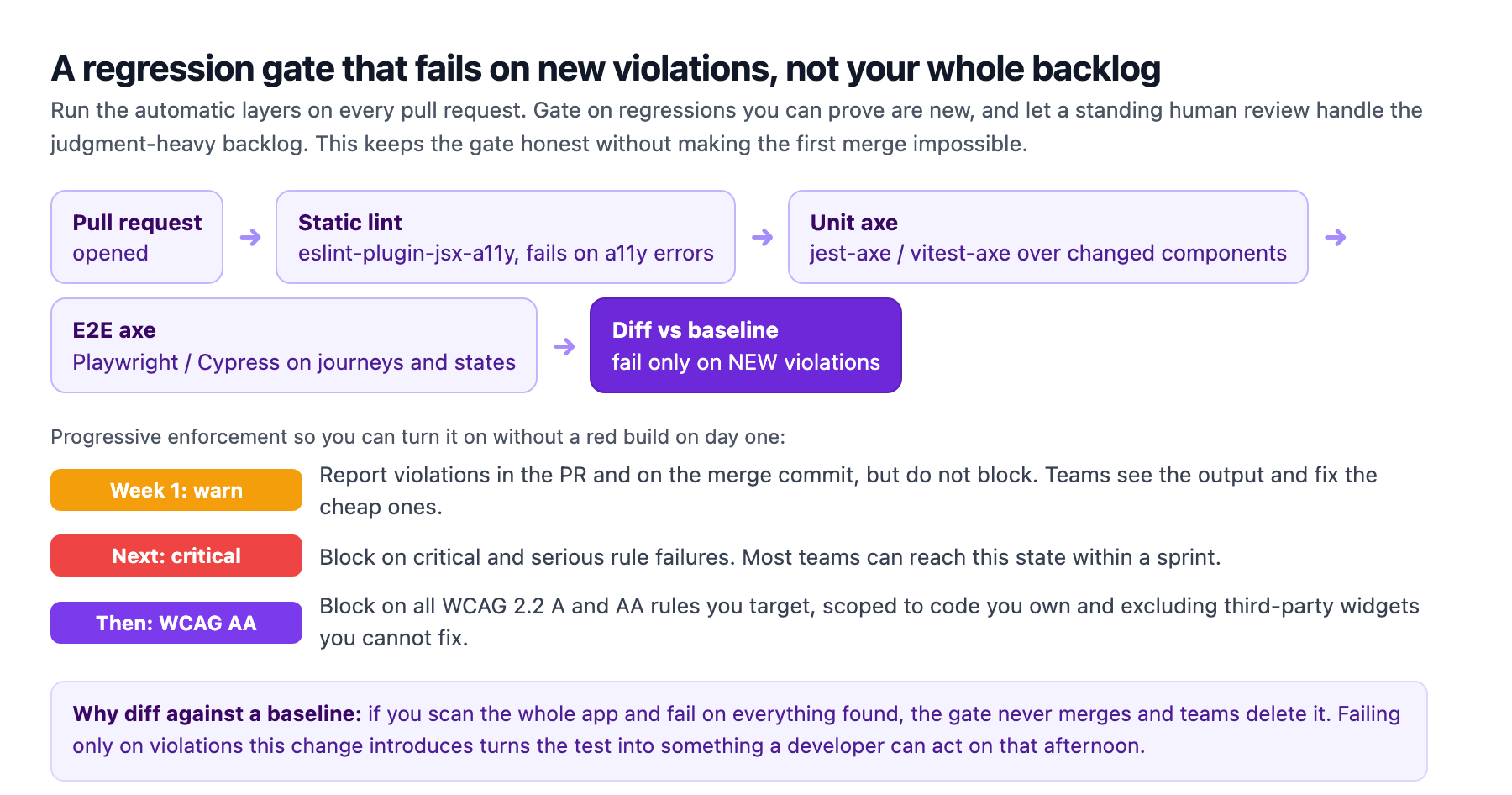
The way all of this becomes something a delivery team can sustain is to make the automatic layers a hard gate that fails on regressions, not on the entire pre-existing backlog. This distinction is the difference between a gate that survives and one that gets deleted on the first red build.
A common failure is to scan the whole application, find hundreds of pre-existing violations, and try to fail the build on all of them. The build goes red immediately, the team has no realistic path to green in that sprint, and the gate is disabled within a week. The alternative is to enforce progressively. Start by reporting violations without blocking, so the output is visible and teams fix the cheap ones. Then start blocking on critical and serious rule failures. Then move to blocking on all the WCAG 2.2 A and AA rules you target, scoped with withTags to the standard you claim, and with third-party widgets you cannot fix excluded from the scan so they do not poison the gate6.
The sharpest version of this is a diff against a baseline: the gate fails only when this pull request introduces a violation that was not there before. A developer who sees a failure then knows the problem is in the code they are touching, which makes it actionable that afternoon rather than an open-ended archaeology project. Meanwhile the judgment-heavy layers, the keyboard walk and the expert review, run on a scheduled cadence and feed a standing backlog the team works through deliberately.
A rule about gates applies to every part of this. At Adroit we run our own content and delivery pipelines through mandatory verification gates, and the discipline is the same: the gate must fail fast on the specific thing a change introduced, and it must be scoped to what the author controls. When the gate stops being able to tell a developer what to fix, it stops being a gate and becomes noise. The same principle transfers directly to accessibility in any client codebase.
The 2026 twist: AI is writing more of the UI
The reason this matters more now than it did two years ago is that the volume problem is accelerating. WebAIM's 2026 analysis points to the growth in home-page complexity and automated, AI-assisted coding as a major contributor to the accessibility regression2. ARIA usage climbed 27% in a year to an average of over 133 attributes per page, roughly six times its 2019 level, and the average home page now carries 1,437 elements, up 22.5% in one year2. More code, generated faster, by tools that have no intrinsic accessibility intent, produces more of exactly the structural failures a rule engine detects.
That is the counterintuitive payoff. As more of the interface is generated by AI, the automated accessibility net becomes more valuable, not less. A well-scoped axe gate in CI is the check that keeps an AI-generated component library honest, because it catches the low-contrast text, the missing labels, and the unlabeled buttons that a large language model will happily emit in volume. The design-system team that bakes these checks into the pipeline is not adding process friction; it is adding the one reliable guardrail against a fast and indifferent generator.
The practical starting point is small and specific. Pick one critical user journey, wire @axe-core/playwright into CI against the WCAG 2.2 AA tags, run it in reporting mode first, and add the keyboard walk to your definition of done for anything that introduces focus or dialog behavior. Fix the six WebAIM categories where the engine is strongest, because they are where the measurable regression is happening. Then treat the judgment layers as the standing discipline that keeps the unmeasurable half from rotting. That combination, an automatic regression net plus a deliberate human layer, is what actually stops accessibility from going backwards again.
Sources
-
WebAIM, "The WebAIM Million: The 2026 report on the accessibility of the top 1,000,000 home pages." WAVE-detected WCAG 2.2 A/AA failures; 95.9% of pages with failures, 56.1 average detected errors per page, six error categories accounting for 96% of errors. webaim.org ↩ ↩2 ↩3 ↩4
-
WebAIM Million 2026, methodology and technology analysis. Home-page complexity (1,437 average elements, +22.5%) and ARIA growth (+27% to 133+ per page) tied to automated and AI-assisted coding. webaim.org ↩ ↩2 ↩3
-
University of Arizona, "Accessibility Testing in CI/CD." Testing pyramid, axe-core scope, 10-100x fix cost, tool setup, and progressive enforcement. accessibility.arizona.edu ↩ ↩2 ↩3 ↩4 ↩5 ↩6
-
Kevin (dev.to), "Automated Accessibility Testing: axe-core, Keyboard Navigation and WCAG in the Browser." Benchmark across five public sites where axe-core found 38 of 204 WCAG 2.1 AA-required issues and a keyboard-walk layer caught the remaining 166. dev.to ↩ ↩2
-
Deque Systems, "Automated Testing Identifies 57% of Digital Accessibility Issues." A study of axe suite coverage on real applications. deque.com ↩
-
axe-core documentation and Playwright accessibility-testing guide. Zero-false-positive rule engine,
@axe-core/playwrightandwithTagsscoping to WCAG tags. github.com and playwright.dev ↩ ↩2 ↩3 ↩4