
Design system versioning feels harder than it should. Teams adopt semantic versioning, cut tags, publish release notes, and still find a product team on Slack at 5pm asking why a "minor" update broke their checkout flow. The version number is rarely the real problem. The social contract behind it is1.
This article is about that gap: how a design system ships change without shattering the products that consume it. Not the mechanics of tagging a release, which is settled. The discipline of deciding what counts as breaking, giving your consumers a real window to migrate, and making the upgrade cheap enough that they take it.
We keep saying a design system is a product, and our token-first design-systems guide made the case that the foundation is what scales. If it is a product, it has consumers, and consumers have launch cycles, deadlines, and their own priorities. A breaking change that feels like healthy cleanup to you is a weekend-minefield to a team mid-launch. Managed well, breaking changes let the system move forward and bring its consumers with it. Managed poorly, they fragment adoption, create forks, and erode the trust your whole system runs on2.
The version label lies
Semantic versioning is a clean vocabulary. Major versions signal breaking changes, minor versions add functionality, patch versions fix bugs. The model works when it maps cleanly onto a component library3. The trouble is that a component change is rarely one kind of change.
A designer can look at a form-field update and call it "visual only." The component still looks familiar. But engineering experiences it as breaking because the error-state spacing changed, the helper text wraps differently, and one mobile screen lost its primary action below the fold. What looked like a patch to the author is a behavioral change to the consumer, and nobody flagged it because nobody defined what "breaking" means on the way in1.
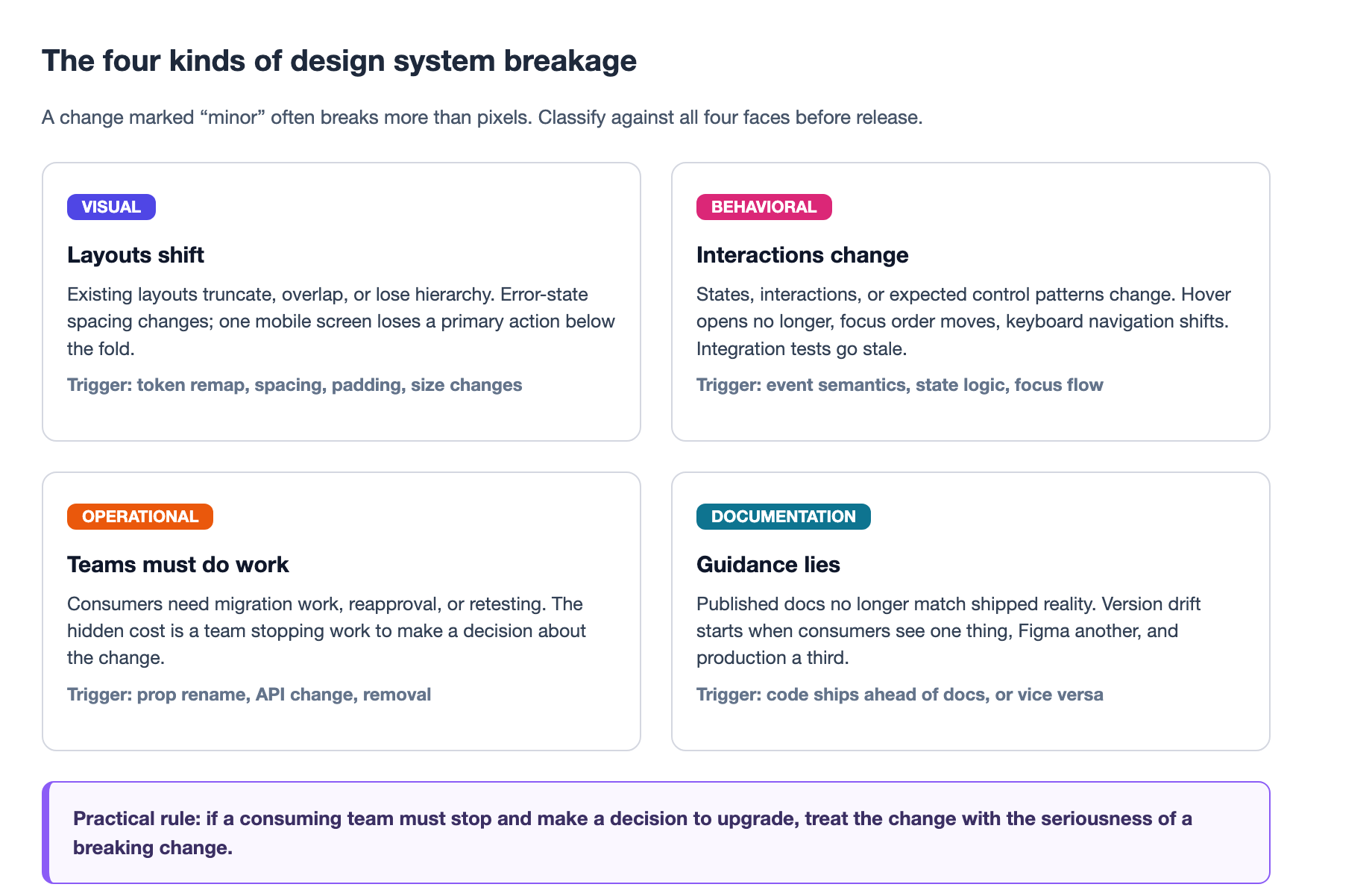
That is the category that gets teams in the most trouble, the one rarely named before release day: behavioral breakage. A menu that used to open on hover now opens only on click. A button that gained a confirmation dialog mid-form. A date input whose keyboard navigation changed. None of these change the visual contract, all of them change how the product behaves for the person using it, and every integration test that referenced the old interaction is now stale1.
The practical rule worth writing on your team's wall: if a consuming team must stop and make a decision to upgrade, treat the change with the seriousness of a breaking change1. Stopping to decide is the real cost, not the pixel shift. Define your breakages before release day, and include all four faces publicly so a reviewer can run any change against a published list1.
Semantic versioning, applied on purpose
Semantic versioning is the right foundation, and discipline around it is essential. Reserve breaking changes for major versions, and let a minor bump signal new features without breakage2. The predictability is the point: consumers read the version and know roughly what adopting it will cost them, which lets them plan migration work against their own roadmap2.
But do not be dogmatic about it. Shaun Bent, who led design systems at Spotify for nearly nine years, warns that if you wait strictly for major releases to ship every improvement that might break something, you end up paralyzed. A backlog of breaking changes builds up, far more than you can safely ship in a single release, and the system starts to stagnate2. The discipline has to be paired with data.
That is where component usage data earns its place. When you know how and where each component is used, you can bend the rules safely:
- Zero usage. If nobody uses a component or API, change it in a minor release. There is no code to break2.
- Low usage. If only a handful of teams use it, run the migrations for them, then land the change in a minor release2.
- High usage. Stick to major releases. The risk and the migration effort are too high to route any other way2.
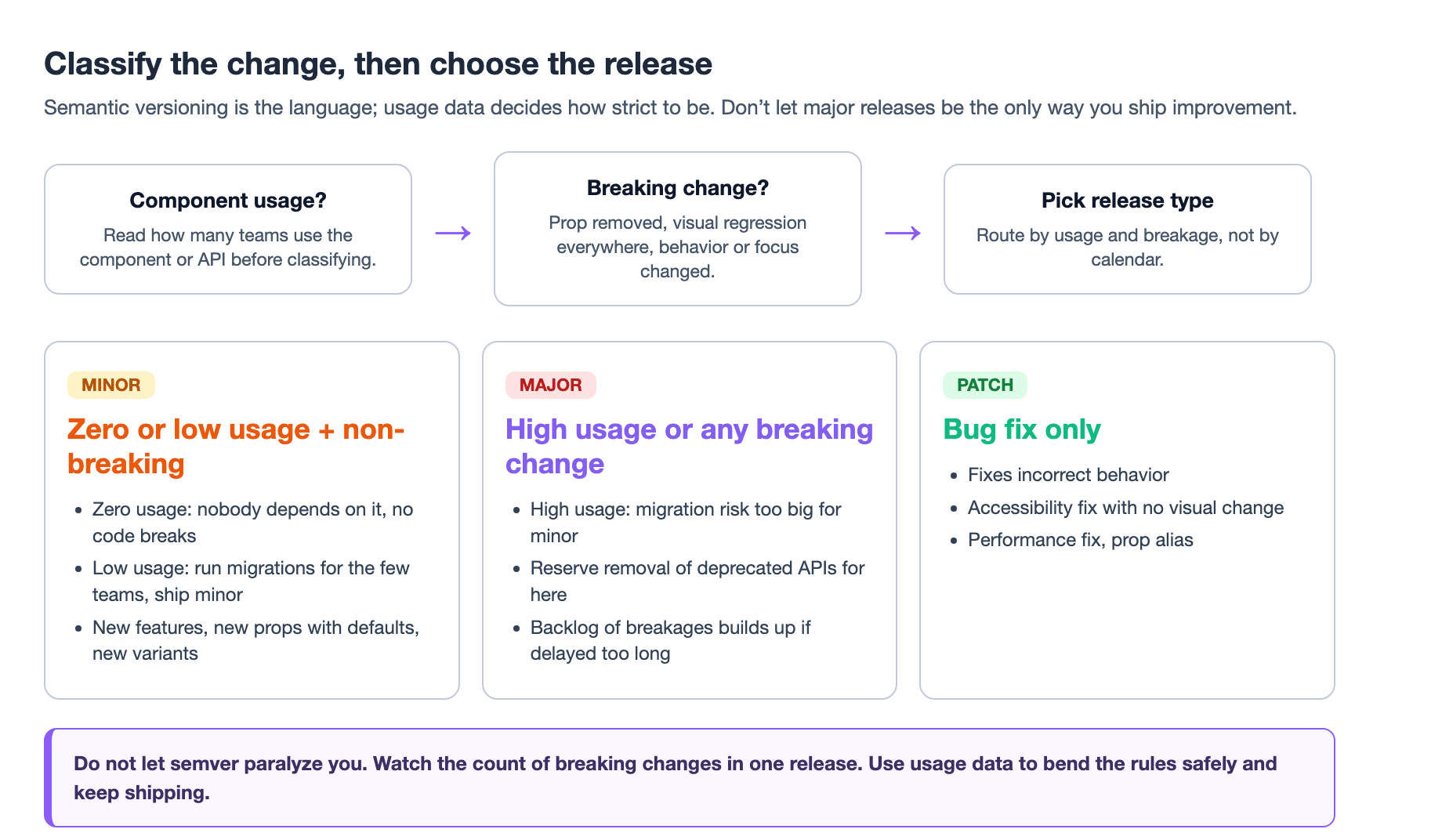
This is not a license to be sloppy. It is the opposite: a published, data-backed standard your consumers can audit. Consistency builds predictability, and predictability is what lets teams trust the system2. When you define a scenario as breaking, you hold the line even when it is inconvenient. If you make exceptions when it suits you, the definition stops meaning anything2.
Deprecate before you remove
The single most reliable way to keep a major release from becoming a pile of broken files is to stop deleting things without warning. Deprecate first, remove later, and give teams time to move. A three-phase process handles this cleanly4.
Phase one: deprecation warning, in a minor release. Mark the old API as deprecated but keep it working. Emit a clear warning in development mode that names what is deprecated, what to use instead, and where the migration guide lives. Support both the old and new paths during the transition so existing code keeps running while new code adopts the cleaner API4.
Phase two: an extended deprecation window. Give teams at least three months, ideally six, to migrate4. Use the window to track who still uses the deprecated API, reach out to the teams that do, and invest in codemods so the repetitive migration work is automated rather than manual4. A deadline nobody can hit is not a deadline, it is a surprise wearing a date.
Phase three: the breaking release. After the window closes, remove the old API and ship the major version, with a changelog, a step-by-step migration guide, a codemod, and a named support channel4.
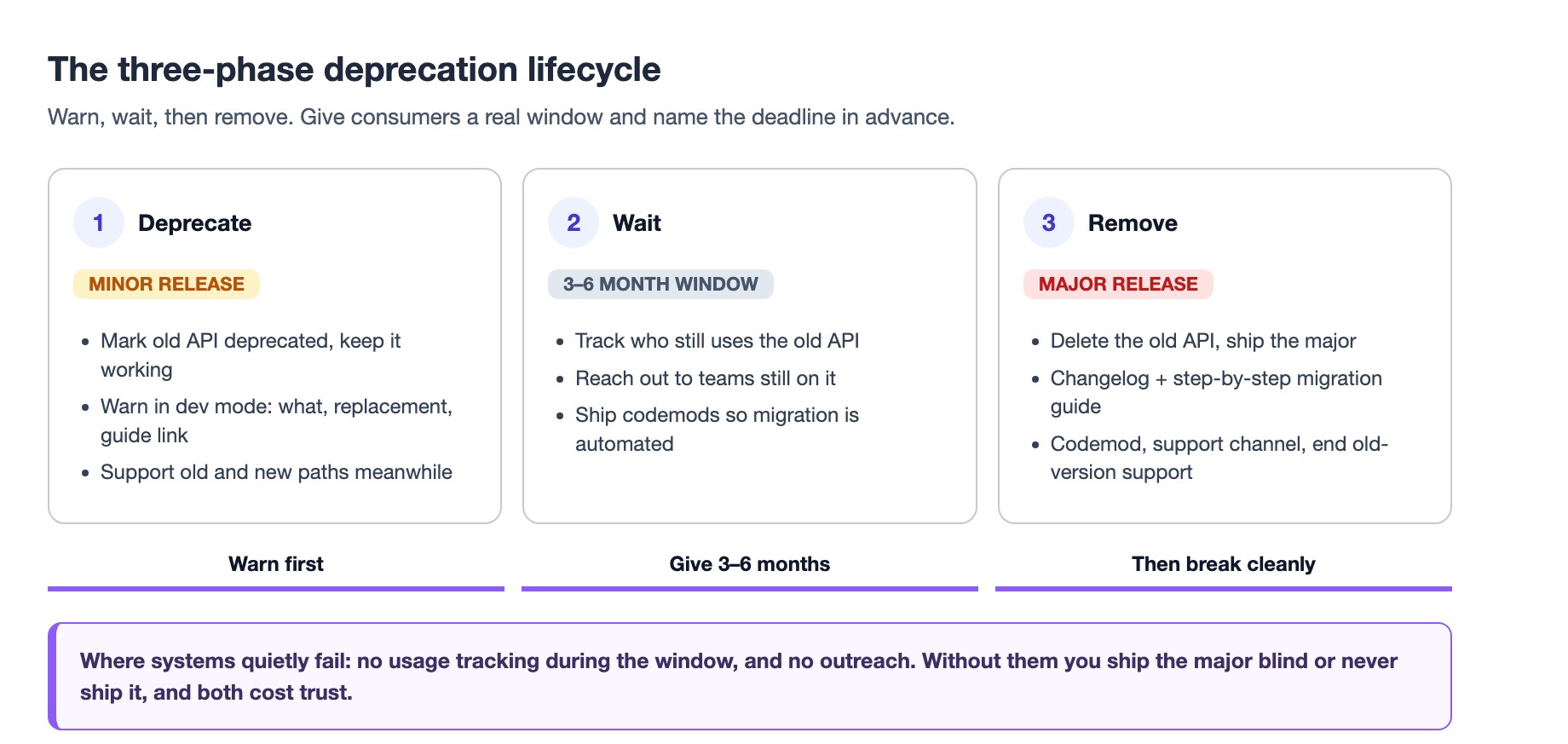
The deprecation period is where most systems quietly fail, because it requires two things teams rarely budget for: tracking who still uses the old API, and actually reaching out to them. If you skip the tracking, the window expires and you have no idea whether anyone is still leaning on the deprecated path. You then either ship the major release blind or delay it indefinitely, and both outcomes cost you trust4. The safety net that catches a mis-shipped release is visual regression, which we covered in our design-system testing guide. Release discipline keeps a change from breaking consumers; that testing layer keeps a change that did slip through from reaching them unannounced.
A less comfortable but honest recommendation from teams that have done this at scale: once you release a major version, consider ending support for the previous one. Every fix you backport to an old version gives consumers a reason to stay there, splits your attention, and keeps you maintaining the past instead of building the next thing2. Draw the line, handle genuine exceptions as exceptions rather than as the new default, and protect the momentum of the upgrade path you built.
Make the migration cheap
The biggest predictor of whether your major release is adopted is not the quality of your design, it is the size of the upgrade bill you hand your consumers. Upgrades that are punishing to do get deferred, and deferred upgrades accumulate debt until they become impossible. Strong migration tooling is the highest-return investment you can make in a design system2.
Codemods are the workhorse. Automate the mechanical parts, the prop renames, the moved imports, the restructured variant names. When a change is a rename like the Button type prop becoming variant, a codemod can sweep a consuming codebase and handle a large share of the work in minutes4. The pair of a good codemod and a clear guide turns a feared upgrade into a standard chore.
The guides themselves matter more than most teams credit. A migration guide that lists "Button type prop removed" and stops is nearly useless; your consumers have hundreds of files and no sense of how long the fix will take or why it is worth it. A useful guide says why the change happened, what it standardizes, the estimated migration time, and the share of work a codemod covers4. Shopify's Polaris is the widely-cited example of maintaining in-depth, per-version migration guides that walk a team from one major to the next3.
There is a newer lever here worth noting. The same AI coding tools that write your UI can now chew through a large share of migration work too, and clear, well-structured migration guides make those tools dramatically more effective at it2. That turns the guide from documentation into an input to automation, which is a genuine shift in how much a breaking release can cost.
Whole library or individual components
The other decision your release discipline has to make is at what granularity you version: the whole library as one package, or each component as its own mini-package. Brad Frost's analysis frames it as a real fork with real tradeoffs, not a preference5.
Versioning the whole library is simpler. One package version covers everything, the components in a release are guaranteed compatible with each other, and a single UI-kit version can stay in sync with the code library. A consumer bumps once and gets a coherent release. The cost is forced adoption: a product team pulls in changes to components they were not touching, and if one breaking change in the batch is unrelated to their work, they still have to deal with it5.
Versioning individual components gives teams control. The datepicker team pulls only the datepicker update and schedules it against their own timeline. The cost is overhead and risk: maintaining independent packages, an inability to test every version combination for compatibility, potential multiple versions of the same component on one page, and a harder job keeping design tools and docs in sync5.
The pragmatic answer depends on your system's reach. If your design system powers one or two products, manage the library version as a site-wide concern for cohesion and quality5. If it powers dozens or hundreds of applications across many technologies and ages, individual packaging may be the only way teams can adopt it incrementally, and you accept the fragmented-consistency tradeoff to get there5.
Whichever you choose, do not bury your token layer inside it. Tokens travel to iOS, Android, and design tools that a React component library never touches, so they often deserve to be treated as a standalone, independently-versioned product consumed by your libraries as a dependency5. If a versioning problem is really a token problem wearing a component costume, layer the release discipline down at the primitives, because a spacing token change has a blast radius across every surface that a single component API change never reaches1.
A contract of trust, not a ritual
Taken together, none of this is bureaucracy for its own sake. Design system versioning works when teams treat it as a contract of trust with their consumers1. The version number matters, and the surrounding clarity matters more: a published definition of what counts as breaking, a migration path documented before release, and communication that respects how product teams absorb change1.
Surprise is the enemy of adoption. When planning a major release, start communicating well before it lands, name when to expect it, what it ships, what action consumers need to take, and how to prepare. Repeat the message across channels, because it will be missed the first time. Better to over-communicate than to let a consumer learn about a breaking change the day it ships2.
The practices in this article compound. Define breaking publicly, and a reviewer can classify any change before it ships. Hold minor releases for non-breaking improvement based on usage data, and the system keeps moving. Deprecate early with a real window and cheap tooling, and the major release stops being a threat. Version at the granularity that matches your reach, and you stop forcing work on teams it does not benefit.
If your team has never done this, start small. Audit your last three design system updates. For each one ask four questions: was the change classified correctly, was the migration path clear, did the documentation match what shipped, and do you actually know who adopted it1? The gaps in those answers tell you which layer of release discipline to fix first, and the fix does not require a new tool. It requires deciding how you treat the people your design system ships to.
Sources
-
"Design System Versioning: Manage Your UI/UX in 2026," Figr, July 2026. figr.design - the version label can lie, the four faces of breakage (visual, behavioral, operational, documentation), the "if a consuming team must stop and make a decision" rule, the 5-step release workflow, the anti-pattern list, and the audit-your-last-three-updates test. ↩ ↩2 ↩3 ↩4 ↩5 ↩6 ↩7 ↩8 ↩9
-
Shaun Bent, "Handling breaking changes in a design system without causing chaos," zeroheight, January 2026. zeroheight.com - defines breaking changes, semantic versioning discipline, the don't-paralyze-yourself usage framework, early/over-communication, migration tooling and AI-assisted codemods, ending support for old versions, and handling exceptions. ↩ ↩2 ↩3 ↩4 ↩5 ↩6 ↩7 ↩8 ↩9 ↩10 ↩11 ↩12 ↩13
-
"How to Version Design Systems: 8 Real-World Examples from Industry Leaders," Supernova. supernova.io - semantic versioning applied to design systems, with IBM Carbon, Google Material UI, and Shopify Polaris as major-library examples, and component-level SemVer through Twilio Paste and Atlassian. ↩ ↩2
-
Roberto Moreno Celta, "Versioning Your Design System Without Breaking Client Sites," Design Systems Collective, November 2025. designsystemscollective.com - the three-phase deprecation workflow (warn in minor, extended deprecation window of at least 3 months, remove in major), usage tracking, codemods, and the migration-guide quality bar. ↩ ↩2 ↩3 ↩4 ↩5 ↩6 ↩7 ↩8
-
Brad Frost, "Design system versioning: single library or individual components?" bradfrost.com - the tradeoffs of whole-library versus per-component versioning, the granularity-by-reach rule, and treating tokens and icons as independently-versioned assets. ↩ ↩2 ↩3 ↩4 ↩5 ↩6