
Most Agentforce coverage is one-directional: how to expose a Flow as an action your agent can call. That direction is real and useful, but it treats Flow as a tool the agent reaches for. The other direction, Flow invoking the agent, is where the orchestration value lives, and it gets far less attention. At TDX 2026 Salesforce ran a session on it, "Orchestrate Agents with Salesforce Flow": invoke Agentforce agents directly from Flow, add administrative guardrails, and convert outputs into structured data for consistent results 1. Summer '26 then made the plumbing native. This is the implementation guide: what to build, the constraints that shape the design, and where Apex still wins.
Why this matters now: the plumbing went native
For two years the "Flow calls an agent" story lived in a single standard action. In April 2025 Salesforce shipped the AI Agent action, which lets any flow invoke any active Agentforce agent: you add an Action element, open the AI Agent Action folder, pick an agent, pass a user message and an optional session ID, and capture the agent's response in an output variable 2. It worked, but it was a niche integration point most teams never touched.
Summer '26 changed the economics and the ergonomics. The new Run Agent element in Flow Builder lets you select an existing agent or create and activate a task-specific one directly on the canvas, with instructions pre-populated from best-practice text, and configure structured outputs that connect the agent's response to your flow's variables 3. It rolled out on a rolling basis starting June 1, 2026, in Enterprise, Performance, Unlimited, and Developer editions with an Agentforce add-on 3. Existing flows that use AI Agent actions convert to the new element automatically when opened, preserving the original agent configuration 4.
The second unlock is Flow Orchestration. Previously a paid add-on with usage-based run entitlements, it became a standard Flow type on February 18, 2026, included for all customers subject to normal Flow edition limits 5. That removes the "we'd love to orchestrate but the entitlements are a problem" conversation entirely.
Why this is the right mental model: analysts covering Summer '26 describe Flow as the execution layer of the agentic enterprise, the deterministic mechanism through which Agentforce delivers business processes with precision and control, complemented by Apex where required 6. Agents bring judgment; Flow brings guarantees. Once Run Agent is one drag away, the question becomes "which steps need judgment and which need determinism," not "should we use Flow or Agentforce."
Pattern 1: the AI Agent action, done right
The base pattern is simple, and the details are where it gets good. In Flow Builder, add an Action element and search for the AI Agent Action folder. You get one action per active agent. Specify a user message and an optional session ID, then capture the agent's response. Salesforce's own guidance is to create input variables for the user message and session ID so the flow can populate them dynamically, and to include an agent response output variable to capture what comes back 2.
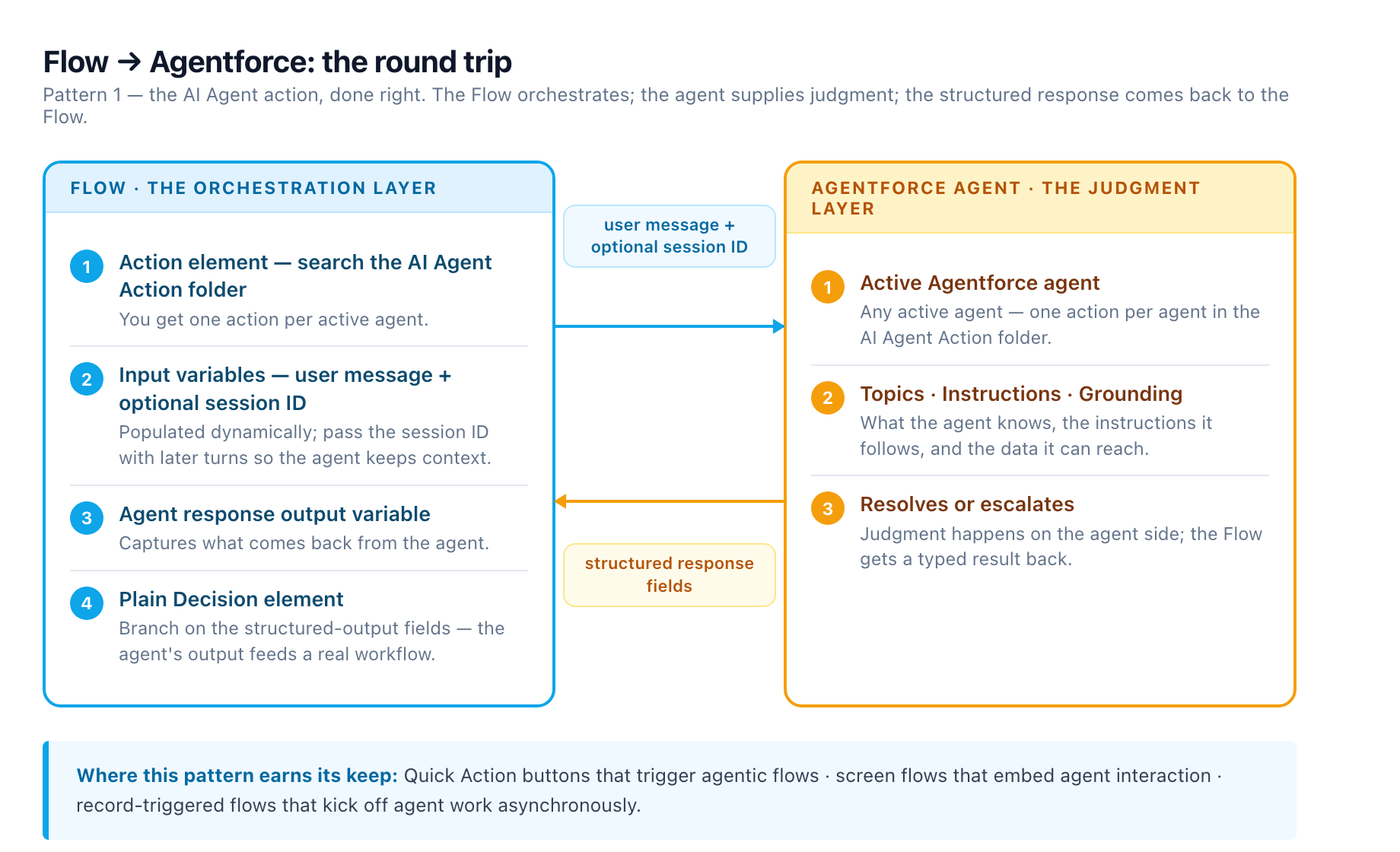
The session ID is the multi-turn mechanism. A session ID is generated on a user's first message; pass it with subsequent messages so the agent remembers previous exchanges and maintains context. Many use cases don't need multi-turn at all, but the ones that do, like a screen flow that lets a rep interrogate an agent across several questions, break without it 2.
The Summer '26 structured-output upgrade matters more than it sounds. On the Run Agent element you configure the agent's response, including structured outputs, to connect with the flow's variables and logic 3. Instead of parsing a blob of prose, you declare the fields the agent returns, then branch on them with a plain Decision element. That is the difference between an agent that "writes a summary somewhere" and an agent whose output feeds a real workflow.
Where this pattern earns its keep: Quick Action buttons that trigger agentic flows, screen flows that embed agent interaction, and record-triggered flows that kick off agent work asynchronously 2. You can even facilitate limited agent-to-agent communication by using the action inside a flow-based agent action 2.
Pattern 2: custom invocable actions vs standard Agent API actions
Once you move past the simple case, you choose between two invocation styles. Salesforce provides a custom agent invocable action for each Service agent, Employee agent, and default agent, and recommends them for most use cases because they handle more of the conversation automatically. You configure trigger conditions, the task the agent completes, the data it needs, and the fields it responds with, all with clicks instead of code 7.
The official example is instructive: call an agent to summarize a service case, then make a second call that uses that summary to draft an email response. You can call the same agent multiple times from one flow for separate but related tasks, or call multiple agents from the same flow for more specialized work 7.
Standard Agent API invocable actions are the advanced option. They give direct access to the Agent API from a flow or Apex class with four actions: Start Session, Send Message, End Session, and Submit Feedback. They require more configuration but give you granular control over the session, for example ending a session when certain conditions are met, or collecting user feedback and storing it in Data Cloud 7. Decision rule: custom invocable actions for the 90 percent of cases where a configured task plus structured response fields does the job; standard Agent API actions when you need session lifecycle control or feedback capture.
The constraints that shape the design
This is the section that saves you a failed deployment. Four constraints, all from the official documentation, all easy to discover the hard way.
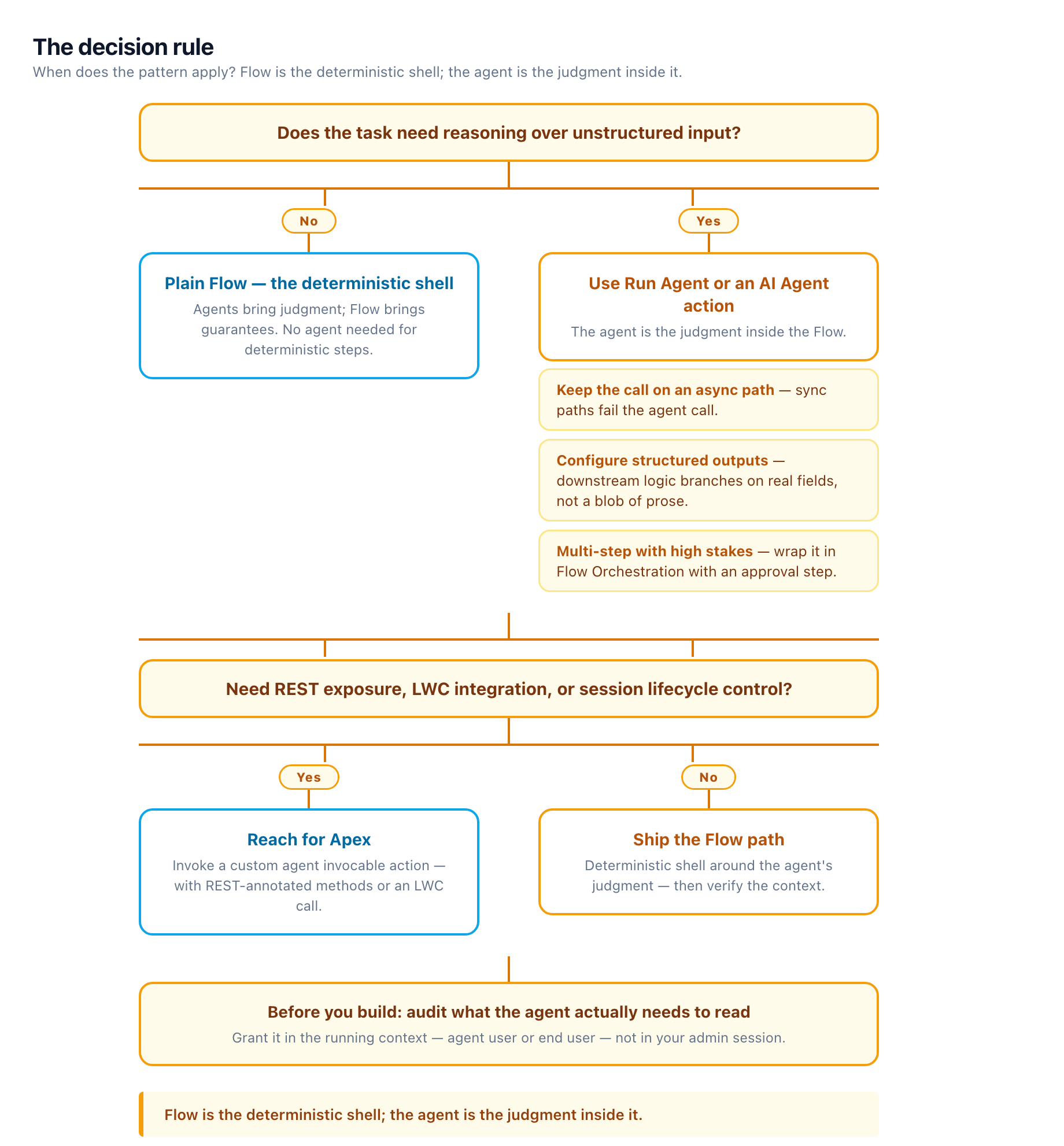
Async paths only. In flows, you can only call custom agent invocable actions and standard Agent API invocable actions in asynchronous paths, not in paths that run immediately 7. If your record-triggered flow fires the agent call in the synchronous path, it fails. Design for it: put the agent call on a scheduled path or an async branch, and resume when the response lands.
Agent context is not your context. Flows that call an Agentforce Service agent run in the context of the agent user, so that user needs permission sets granting read access to any records the agent actions touch, for example Case read access for a summarizer. Flows that call an Employee agent or default agent run in the context of the authenticated end user 7. Test with the actual running context, not with your System Administrator profile.
Two hard exclusions. Agent invocable actions are not supported for Experience Cloud site users or the Platform Integration User 7. If your portal or integration user is the entry point, this pattern won't work there; route through a licensed user context instead.
Strip the conversational furniture. Standard subagents and actions are designed for conversational use cases and may not work as expected with invocable actions. Salesforce's guidance is to remove them and create custom actions for your use cases 7. Custom agent invocable actions also don't support custom variables or the standard context variables $Context.EndUserId, $Context.RoutableId, $Context.EndUserLanguage, and $Context.EndUserContactId 7.
On top of those, the ordinary Flow rules still apply: watch flow timeouts, implement fault paths, and remember every agent call is metered consumption, the cost model laid out in our Agentforce in Practice deep-dive 8.
Flow Orchestration is the container the pattern was waiting for
The single-agent invocation is a building block. Flow Orchestration is the structure that turns it into a process. With orchestration you string multiple steps into one cohesive journey spanning different users, departments, and timeframes, hand off tasks between people, and build in pauses for approvals or manual steps that take days or weeks without the automation breaking 5.
The agentic pattern that falls out of this: an orchestration step invokes the agent to produce a structured output, a human-in-the-loop approval step reviews it, and the next department's step picks it up. Summer '26 sharpened the approval leg with group approval steps that can require unanimous approval, generating individual work items for each group member and failing the whole step if any one person rejects 9. For a contract or compliance workflow where an agent drafts and a committee signs off, that is the whole process in one orchestration.
The practical trigger: if you ruled out Flow Orchestration before because of run entitlements or the add-on price, re-evaluate now. It is a standard Flow type as of February 18, 2026, with no usage-based caps in the supported editions, and the Work Guide shows users what to do and when on the record page 5.
When Apex is the right call
Flows cover the declarative path. Apex covers everything else, and the invocation API is clean. You create a custom agent invocable action, find the agent API name on the agent's detail page in Setup, then invoke it with Invocable.Action.createCustomAction('generateAiAgentResponse', agentApiName), passing userMessage and an optional sessionId, and read the response from the result's output parameters 2. From there you can expose your agent as a REST service with a REST-annotated Apex method, or call it from a Lightning web component 2.
The security rule does not bend: agents should always use the permissions of the logged-in user, so external integrations must implement OAuth 2.0 Web-Server or User-Agent flows to force authentication 2.
The shape of the Apex should be familiar if you have worked with the Fortress's documented apex-service-flow-pattern skill, built on the SandPiper booking implementation: a shared service class with inner DTOs for request and response, one thin invocable wrapper per method, savepoint rollback returning structured errors instead of rethrowing, and the Flow branching on a success flag. The same discipline applies to agent calls: define the structured inputs and outputs up front, keep the wrapper thin, and let Flow route on a typed result rather than parsing free text.
The decision rule
Flow is the deterministic shell; the agent is the judgment inside it. Use Run Agent or an AI Agent action when the task needs reasoning over unstructured input, keep the call on an async path, configure structured outputs so downstream logic can branch on real fields, and wrap multi-step versions in Flow Orchestration with an approval step where stakes are high. Reach for Apex when you need REST exposure, LWC integration, or session lifecycle control. And before you build, audit what the agent actually needs to read and grant it in the running context, agent user or end user, not in your admin session.
Summer '26 made all of this first-class. The teams that treat Flow as the orchestrator and the agent as a callable capability will get deterministic, auditable automation out of Agentforce; the teams that treat the agent as the whole product will keep fighting the async constraint, the context model, and the credit bill.
Sources
-
Orchestrate Agents with Salesforce Flow (TDX 2026). salesforce.com ↩
-
Invoke Agentforce Agents with Apex and Flow (Salesforce Developers Blog, Apr 2025). developer.salesforce.com ↩ ↩2 ↩3 ↩4 ↩5 ↩6 ↩7 ↩8
-
Create and Use Agentforce Agents Directly in Flow Builder (Summer '26 Release Notes). help.salesforce.com ↩ ↩2 ↩3
-
11 Flow Updates in Summer 26 Release (Salesforce Break, Apr 2026). salesforcebreak.com ↩
-
Flow Orchestration Is Now a Standard Flow Type (Salesforce Admins Blog, Feb 2026). admin.salesforce.com ↩ ↩2 ↩3
-
Salesforce Summer '26 Release Notes: The Agentic Enterprise Meets Enforced Security (SFDC Penguin). sfdcpenguin.com ↩
-
Call an Agent from a Flow or Apex Class (Salesforce Help). help.salesforce.com ↩ ↩2 ↩3 ↩4 ↩5 ↩6 ↩7 ↩8
-
AI Agents Transforming Salesforce: Agentforce in Practice (Adroit Consulting). adroit-blog-two.vercel.app ↩
-
Jen's Top Summer '26 Release Features For Admins (Salesforce Admins Blog, Jun 2026). admin.salesforce.com ↩