
The analytics split nobody volunteers for
Your Postgres database is great at transactional work: fetching a user profile, inserting an order, updating a subscription. That is the job it was built for. Analytics is a different job. Dashboards scan large slices of the table, aggregate across millions of rows, and keep notebooks and BI tools attached for hours. Run those queries against the same Postgres instance that serves your application and you are trading away the very responsiveness you built the app around. 1
For a long time, Supabase teams had to solve this split themselves. The options were batch exports on a cron, a hand-rolled worker that polled for changes, or wiring up Debezium and running your own CDC infrastructure. All of them are work, and most of them drift out of sync the moment your schema changes.
Supabase just took a real swing at this. Supabase Pipelines moved into public alpha on July 21, 2026. It is a managed change-data-capture service that streams Postgres changes to an analytical destination in near real time, configured entirely from the Dashboard. 1 If you have been putting off the "get our operational data into a warehouse" problem, this is the release that makes it worth re-examining.
How Pipelines works: logical replication, done for you
Pipelines is built on Postgres logical replication. Under the hood it is powered by Supabase ETL, an open source change-data-capture pipeline written in Rust. It reads changes from your Postgres write-ahead log, copies the existing table data once, then streams inserts, updates, deletes, and truncates to the destination as they happen. 1
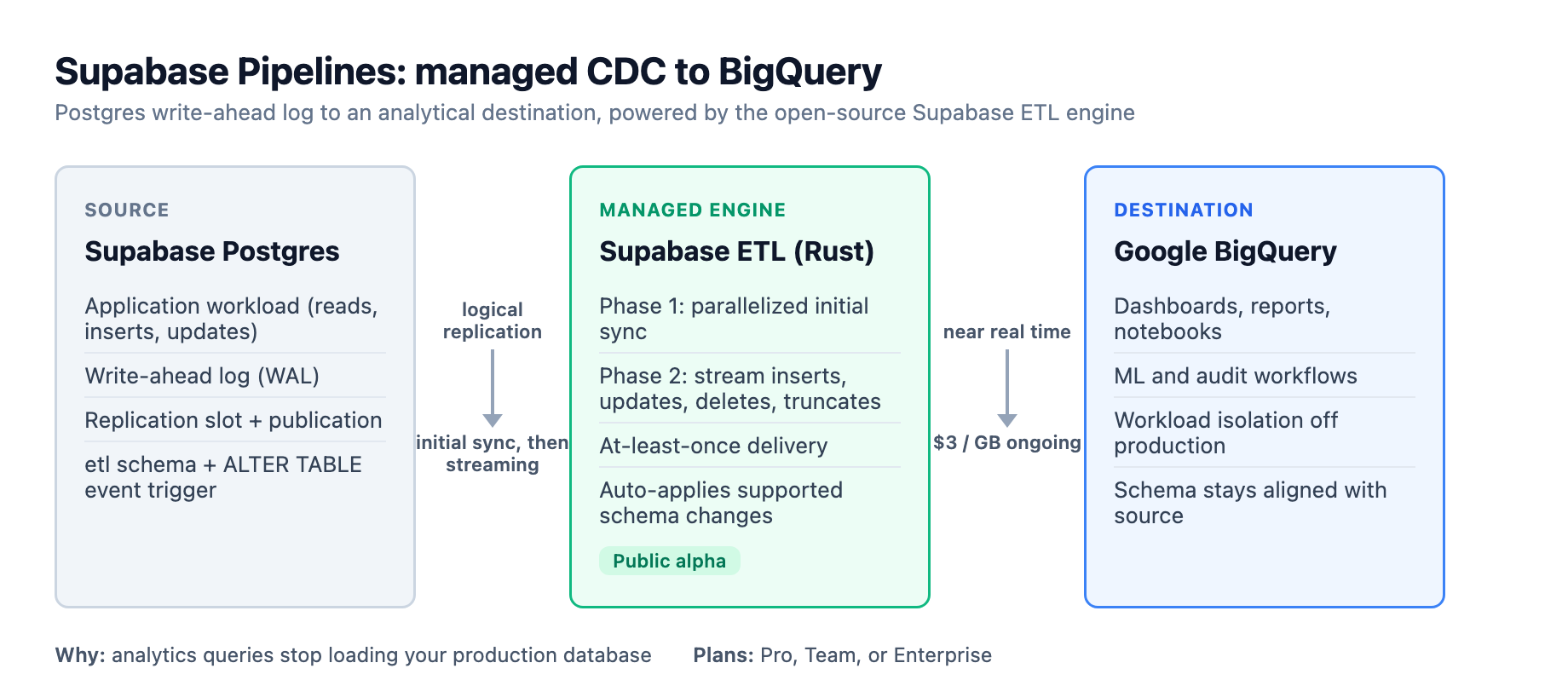
The flow breaks into two phases. First is an initial sync: a complete copy of the tables you selected, now parallelized across tables and within a table so it loads faster than the old private-alpha version. Once the copy finishes, the pipeline switches to streaming mode. New changes are read from the replication slot, batched, and written to the destination. 1
Two design decisions stand out. First, at-least-once delivery: every change is delivered at least once, and BigQuery uses the replicated primary key plus CDC ordering metadata to converge on the current table state. This is not exactly-once. The FAQ is explicit that in rare cases a batch can be counted and then reprocessed after a crash. For analytics and reporting workloads that is usually fine. For building a second source of truth that must be exact, plan for it. 2
Second, the schema change handling. Pipelines installs an event trigger on ALTER TABLE and a set of tables in an etl schema to track replication state. When you make a supported schema change on the source, it detects it and applies it to the destination automatically. That is the feature that quietly kills hand-rolled pipelines: your BigQuery schema stops rotting a week after you add a column. 2
What it replaces: the alternatives you were actually running
The value is clearest when you stack it against what teams were doing. A cron that dumps CSV every night gives you stale data and no deletes. A custom worker that polls for updated_at misses row deletions entirely, because a deleted row no longer has an updated_at to catch. Debezium wired into your own infrastructure gives you real CDC but now you own the connectors, the state, the restarts, and the monitoring. Supabase ETL running yourself, via the open source repo, is an option too, but it means standing up a Rust service and managing its replication slot. 13
Pipelines sits above all of those as a managed version. You pick tables in the Dashboard, choose BigQuery, and Supabase runs and monitors the pipeline that keeps it in sync. 1
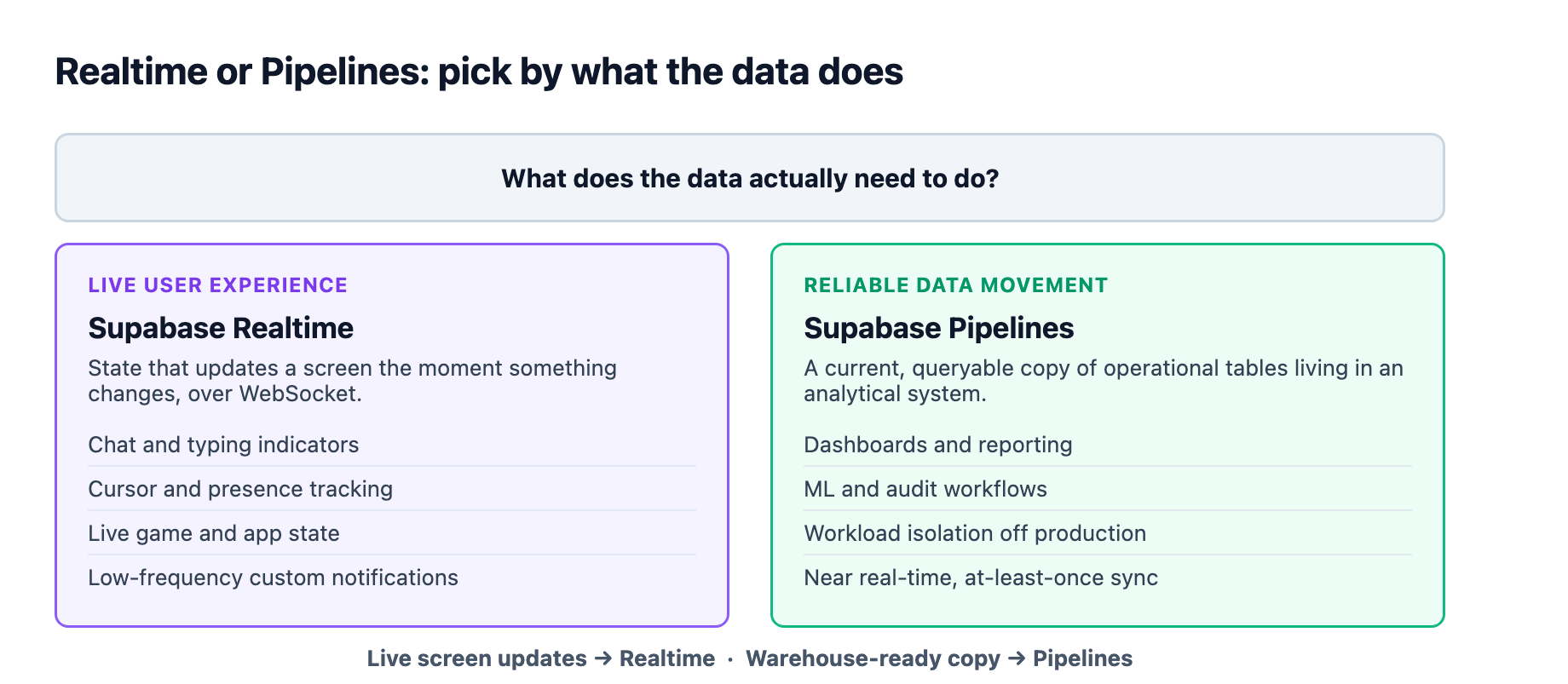
There is a deliberate line here worth naming. This is not the same thing as Supabase Realtime, which we covered here when binary payloads landed in June. Realtime is for live user experiences over WebSocket: chat, cursors, presence. Pipelines is for reliable data movement into analytical systems. If your front end needs live updates, that is Realtime. If your data warehouse needs a current copy of your operational tables, that is Pipelines. 1
The numbers that matter: pricing and operations
Pipelines uses a pipeline-based and usage-based price model, and this is where you should do real math before you adopt it. 1
| Component | Rate |
|---|---|
| Per configured pipeline | $0.053 per hour |
| Initial sync (and resyncs) | $0.60 per GB |
| Ongoing replication | $3 per GB |
The hourly charge starts the moment a pipeline is created and keeps running even while the pipeline is paused or stopped. 4 The only way to end that hourly bill is to delete the destination. That is a billing trap to internalize: a pipeline you "paused last quarter" is still charging you. 12
On the operational side, three constraints shape where you can point this.
Plans. Pipelines requires a Pro, Team, or Enterprise plan. During public alpha access is rolling out gradually, so an eligible plan does not guarantee the feature is enabled for your organization yet; you may need to request access from Database > Replication. 2
Region. Managed pipelines run in AWS eu-central-1, Frankfurt. The further your source, pipeline, and destination are from each other, the more network latency you add to replication, which raises lag and cuts throughput. If you can only optimize one leg, prioritize the destination, because replicated data streams continuously out to it. That means if you are on a US-based Supabase project, expect Frankfurt-anchored latency and choose the closest BigQuery region you can. 2
Destinations. BigQuery is the only destination available to everyone in public alpha. ClickHouse, Snowflake, and DuckLake are on request through an early access form. The open source ETL engine lists those same destinations as in progress, with BigQuery stable and the old Apache Iceberg destination deprecated. 123
Schema change replication: what it handles, what it won't
Schema change support is currently in beta and limited to BigQuery. It handles four operations: adding a column, removing a column, renaming a column, and changing nullability or defaults. 12
The mechanics have rough edges worth knowing before you trust them. Added scalar, top-level columns come into BigQuery as NULLABLE, always. DROP NOT NULL relaxes a BigQuery REQUIRED column to NULLABLE, but SET NOT NULL leaves an existing BigQuery column nullable and just logs a warning, it does not tighten it. Arrays map to BigQuery's REPEATED mode, defaults are applied as destination metadata rather than backfilled into existing rows, and changing a column's data type is not supported at all. 2
The practical read: Pipelines keeps your destination schema aligned for the common cases, but it is not a one-to-one schema mirror. Unsupported changes can still need manual handling on the destination side. The team is open that type changes and other table-level operations are on the roadmap. 12
The traps that will cost you a full resync
This is the section to read twice, because every item here leads to either a stopped pipeline or a billable full re-copy.
Tables need a primary key, and it must be in the publication
BigQuery requires each source table to have a primary key and requires the publication to include its columns. Without one, inserts may replicate but updates and deletes fail. For wide tables, the FAQ recommends REPLICA IDENTITY FULL so enough old-row identity is sent for updates and deletes to resolve. Fix the setting before you generate more changes; if the failing update is already in WAL, you may need to recreate the pipeline or restart that table's initial sync. 2
alter table public.your_table replica identity full;
Generated columns are silently skipped
Generated columns are not replicated, and custom data types replicate as strings. Neither raises an error, but both change the shape of your destination data if you did not expect them. 2
Partitioned tables land as separate destination tables
Unless the publication uses publish_via_partition_root = true. Publications created from the Dashboard replication flow set this, but a publication you built manually may not, and you will get one destination table per leaf partition instead of one per root. 2
A Lost slot means a full, re-billed resync
When the pipeline falls far enough behind that Postgres has already removed the WAL files its replication slot needed, the slot is lost and the pipeline cannot continue from it. Recovery is destructive: recreate the pipeline (or set invalidated slot behavior to Recreate), which resets saved table state, creates a new slot, and re-copies every table, billed again at the initial sync rate. Lag is the thing to watch, and the Dashboard surfaces it as WAL retention remaining and slot status. 2
Do not delete tables you did not manage
If you manually delete or modify a Pipelines-managed table at the destination, replication can stop and Pipelines does not guarantee it will repair it. Recovering can mean a new, billable initial sync. To permanently remove a table, remove it from the Postgres publication first, restart the pipeline, then delete it at the destination. 2
A plan downgrade deletes your pipelines
Dropping to the free plan removes every Pipelines destination created for that project. And if a project goes inactive, running pipelines stop and do not auto-resume; you restart each one manually. 2
The decision rule: Realtime or Pipelines
The cleanest mental model is a two-way fork. If your need is live user experience, state that updates a screen the moment something happens, use Realtime over WebSocket. If your need is a reliable, queryable copy of operational data sitting in an analytical system, use Pipelines. 1
Within Pipelines, the adoption checklist looks like this: confirm every table you want to replicate has a primary key in the publication, set REPLICA IDENTITY FULL on wide tables, decide whether generated columns and custom types are acceptable as-replicated, and accept that it is alpha, so pricing, latency, and behavior can shift with advance notice. 12
At the Fortress, this is the release we have been waiting for to point our live agent dashboard analytics somewhere other than production Postgres. The event layer of that dashboard belongs in Realtime, but the usage and telemetry tables that feed our reports belong in a warehouse, and a managed CDC path removes the custom worker we would otherwise have to build and babysit. 1
The short version: if your Supabase app has outgrown "query the production database for analytics," Pipelines is the managed answer that finally exists. Just do the pricing math, keep the lag monitored, and never assume a "stopped" pipeline is free.
Sources
-
Supabase. "Supabase Pipelines is now in Public Alpha." supabase.com ↩ ↩2 ↩3 ↩4 ↩5 ↩6 ↩7 ↩8 ↩9 ↩10 ↩11 ↩12 ↩13 ↩14 ↩15
-
Supabase. "Pipelines FAQ." supabase.com ↩ ↩2 ↩3 ↩4 ↩5 ↩6 ↩7 ↩8 ↩9 ↩10 ↩11 ↩12 ↩13 ↩14 ↩15 ↩16
-
Supabase. "supabase/etl, a Postgres replication engine written in Rust." github.com ↩ ↩2
-
Supabase. "[Public Alpha] Supabase Pipelines changelog entry." github.com ↩