
The project management tool is no longer a place where humans put status. In the last year the big work-tracking platforms crossed a line: the tool became a surface where software agents read work, write work, and act on it. That changes how a consulting firm buys one, and most buying decisions have not caught up. Teams still compare boards, views, and pricing tiers. The question that matters now is where the agents get access, how much autonomy they are allowed, and whether you can keep one client's work airtight from the next client's.
This is not a prediction about some future tool. The agent-native features are shipping in the platforms consulting teams already run. This article is the decision framework for meeting that shift without letting it run ahead of the parts agents should not touch.
What changed inside the tools
The tools got a new job. A tracker used to be a record of decisions humans had already made. Now it is a runtime: agents pull from it, recommend against it, and write back into it. The three biggest products in the category tell the story.
Linear, the developer-focused tracker, now integrates with coding agents like Cursor, Codex, GitHub Copilot, and Devin that work alongside the team, alongside automated issue routing it calls Triage Intelligence and a feature that turns Slack threads into tracked tickets1. ClickUp took the consolidation route, wrapping tasks, docs, chat, and time tracking in one workspace and adding an AI layer called Brain, plus Super Agents that take assigned work and ambient agents that operate in the background1.
Atlassian made the enterprise case. Its AI assistant layer, Rovo, works across Jira and Confluence, and the adoption numbers from an early buyer are the strongest signal here. The CIO of Expedia Group reports that within about eight weeks Rovo reached 70 percent adoption across the company, and that in roughly six weeks his team had created 200 Rovo agents2. Whatever you think of agentic PM marketing, that is real usage on a real enterprise footprint, and it bends the same direction as everything else.
The connective tissue underneath is the Model Context Protocol, or MCP, the open standard that lets an external agent read and write a tool through a defined interface instead of a fragile scrape or one-off integration3. When a platform exposes MCP, your engineering agents can pull the acceptance criteria for a ticket, do the work, and post the result back into the tracker without a human babysitting the handoff. That single capability is why the tooling decision moved. When your agents can reach the tracker, the tracker becomes part of your delivery pipeline, not a report about it.
Consulting runs on different rules
The generic advice on these tools assumes one team, one product, one engineering org. Consulting runs on different rules that decide the tooling question before any feature list does.
First, confidentiality is the product. A consulting team holds a dozen clients, each with its own data, often under different contracts and regulatory regimes. The tool has to keep those universes hard-separated at the permission, seat, and reporting level, including the AI layer. A copilot that answers a question by pulling context from a different client is not a cosmetic bug, it is a breach. When you evaluate the agent layer, the access-control test comes first, not last.
Second, the acceptance gate is outside the tool. This is the point our piece on stakeholder management hammered: in 2026 the constraint on consulting delivery is not build speed, it is how fast a human in the client organization agrees. The PM tool does not contain your acceptance gate. The client does. So the tool's job is to surface decisions and evidence fast enough that the client can sign off, not to make the decision itself. Agents that draft the report are fine. Agents that pre-empt the sign-off are a hazard.
Third, billing and resource visibility cross projects. Client-services and agency teams pick tools partly for the financial layer, resource utilization, timesheets, deliverable-based billing, because that is how the firm gets paid4. Many of the agent-native platforms treat that as an afterthought. The market signals it too: roughly 62 percent of consulting firms globally use AI, and 63 percent report faster deliverable speeds5. The firms that keep their financial plumbing intact while adding the agent layer are the ones that turn faster delivery into healthier utilization instead of just more free hours.
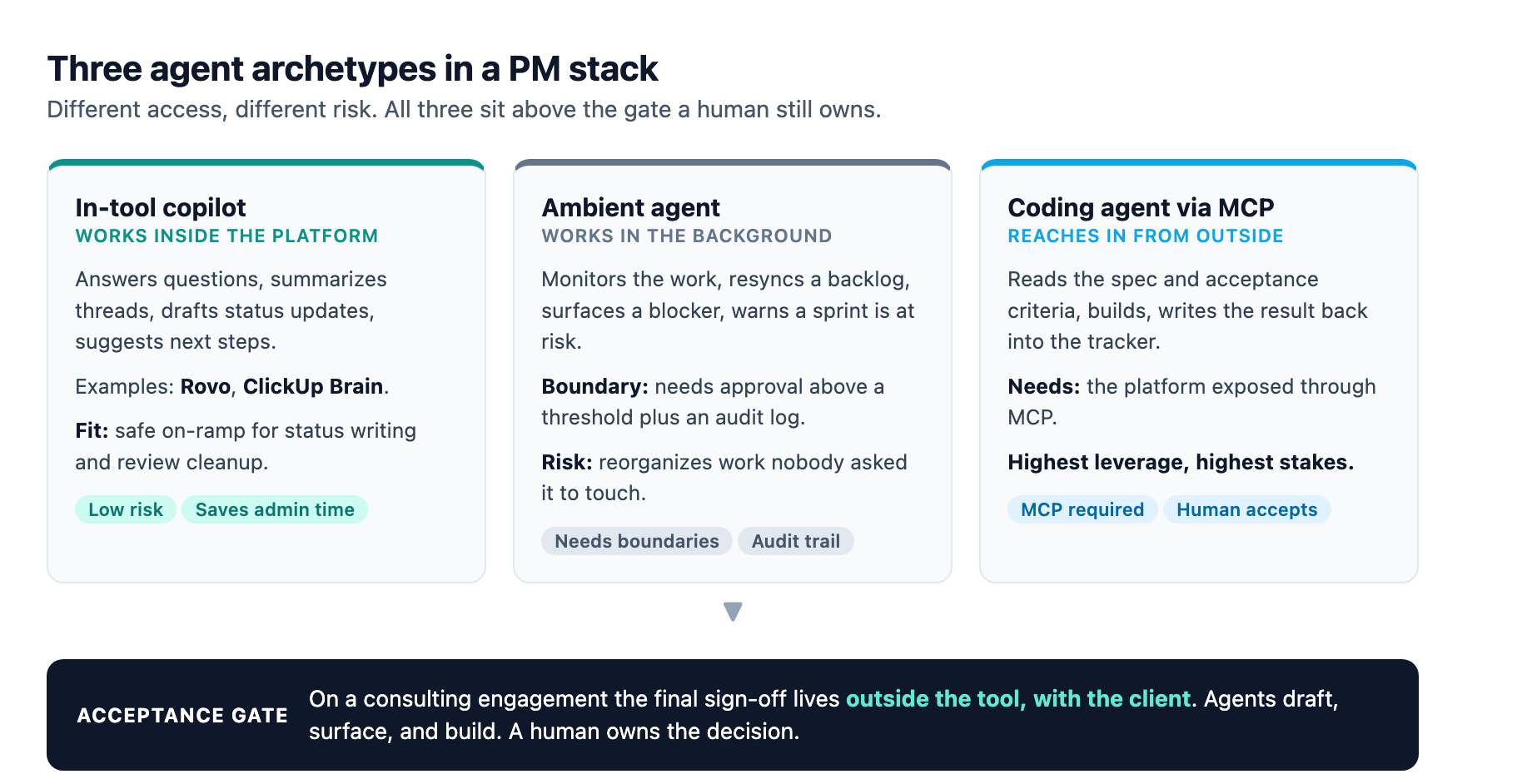
Three agent archetypes, and when each fits
Three archetypes help separate the capabilities, each carrying different risk and value.
The in-tool copilot works inside the platform. It answers questions, summarizes threads, and drafts status updates. Rovo, ClickUp Brain, and most vendor assistants fit here. This archetype is low-risk, mostly saving administrative time, and works within vendor-enforced boundaries. For a consulting team this is the safe on-ramp: status writing, review summarization, and meeting-note cleanup are genuinely automatable without touching the judgment layer.
The ambient agent works in the background, monitoring the work and flagging when things drift. It might resync a backlog, surface a blocker, or warn that a sprint is at risk before a human notices. The value is real, but the failure mode is subtler: an ambient agent that acts without an approval boundary can reorganize work nobody asked it to touch. The vendor guidance is clear that the durable pattern is to give agents boundaries and require human approval above a configured threshold, then keep an audit log of what they did2.
The coding agent reaches in from outside through MCP, and it is the highest leverage and the highest stakes. It reads the spec, builds, and writes the result back. For consulting teams building software this is the archetype that connects the delivery story we have been tracking in our requirements piece and the estimation piece: the spec is the contract, the agent executes against it, and a human accepts the outcome. The tool must expose its data cleanly through MCP or the agent stays on the outside and the handoff is manual3.
The mistake is forcing one archetype for everything. A consulting team that buys an agent-native tool but still babysits every ticket handoff has bought the marketing without the mechanism. A team that flips every automatable action to autonomous has given away the controls on the part of delivery that is still a human commitment.
The four questions that decide it
Run these four questions in order when the pressure is on to pick a platform. They settle more than any comparison table.
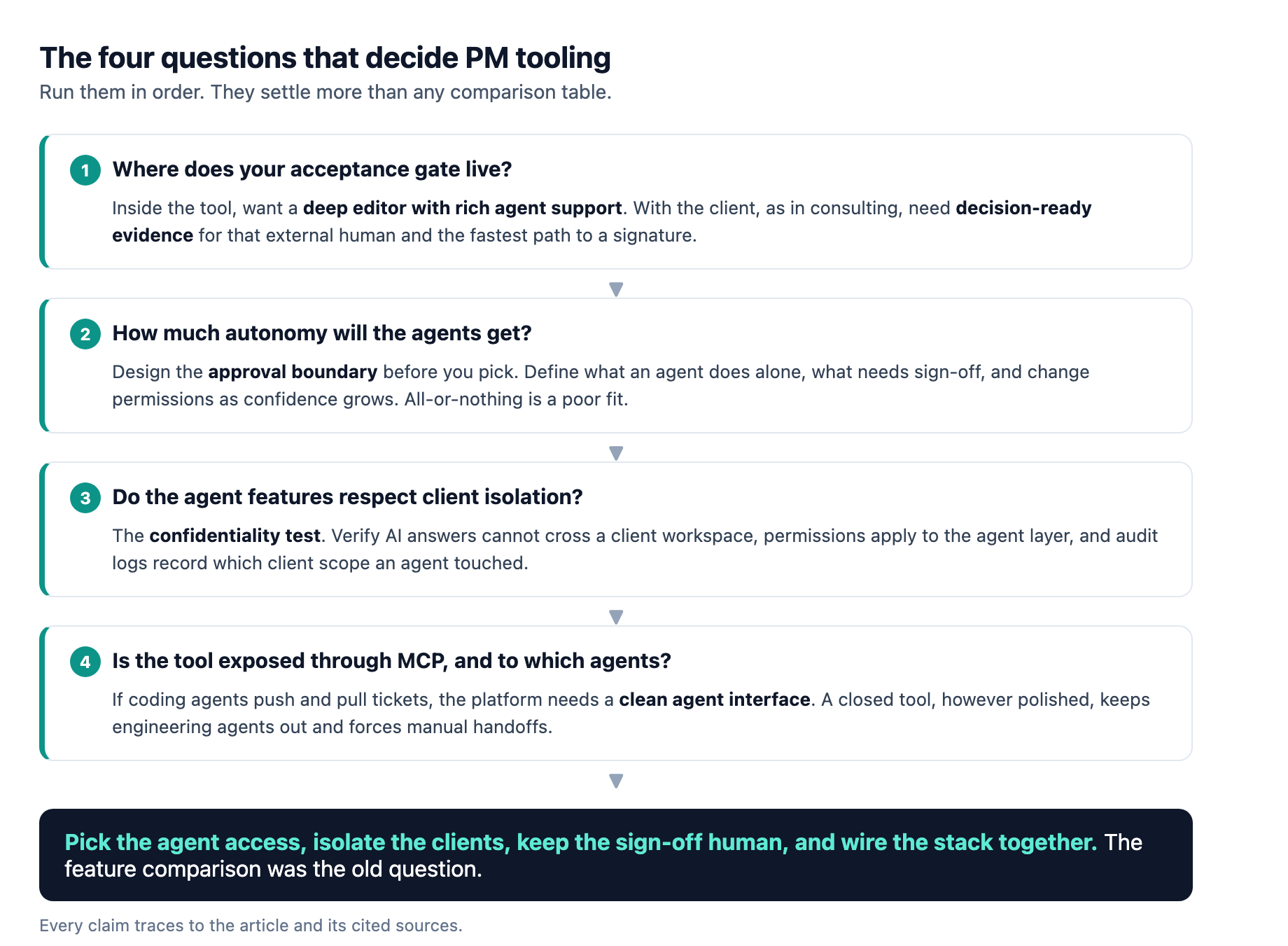
Where does your acceptance gate live? If it is inside the tool, a deep editor with rich agent support wins. If it lives with the client, true for consulting, the tool only needs to expose decision-ready evidence to that external human. That flips the priority from the fanciest agent to the cleanest reporting and the fastest path to a signature.
How much autonomy will the agents get? Design the approval boundary before you pick, because vendors differ in how fine-grained the human-in-the-loop controls are. Atlassian's framing is the durable one: define what an agent can do on its own, what needs sign-off, and change the permissions as the team's confidence grows2. A tool that forces all-or-nothing autonomy is a poor fit for consulting, where some actions are rote and some are commitments.
Do the agent features respect client isolation? The confidentiality test from above, and the hardest to retrofit. Verify that AI answers cannot cross a client workspace, that permissions apply to the agent layer and not just the human layer, and that audit logs record which client scope an agent touched. If the vendor cannot show you the data boundary, the answer is no.
Is the tool exposed through MCP, and to which agents? If you run coding agents that should push and pull tickets, the platform needs a clean agent interface. A closed tool, however polished, keeps your engineering agents out and pushes you back to manual handoffs3. MCP support is rapidly becoming the differentiator that a plain API used to be.
The implementation path
Buying the right tool is the easy half. Making it hold up on a real engagement is the part that fails quietly. The vendor playbooks and the consulting reality converge on a sequence.
Start with a pilot, not a rollout. Pick one low-risk, high-frequency function on one project: automated status reporting, backlog resyncing, or risk flagging. Run it long enough to see patterns and short enough to adjust2. A consulting team that can show a client a pilot where the agent freed a day of reporting without touching the decision layer has made the adoption argument better than any slide.
Set the boundaries in writing. Decide what the agent may do alone, what needs review, and what no agent touches. The commitment class, the sign-offs, the scope changes, stays human. The document class, the reports, the summaries, can automate2. Write that division down, put it in the engagement's operating notes, and update it as trust grows.
Wire the stack together, not just the platform. The agent-native tool is one node in a chain that runs from research to meeting notes to proposals to deliverables5. A tool that does not connect to the firm's research and documentation layer becomes a silo with a chatbot on top. The consulting win is the handoff between stages, and the tooling decision is really a decision about where the handoffs happen.
Measure the right thing. The tempting metric is hours saved on status. The metric that matters is whether decision latency fell, whether utilization improved, and whether the client accepted work faster without a drop in quality. If the tool saves each PM two hours a week but the client sign-off still takes the same calendar days, you optimized the wrong side of the loop.
What to watch for
The agent-native layer brings two risks that are easy to miss until they bite. The first is that an agent amplifies a broken process. Every major vendor says the AI is only as good as the underlying data discipline, and an agent resyncing a chaotic backlog just produces a faster, more confident mess42. The second is faster wrong. If the reporting automates but the acceptance gate stays as slow as ever, the tool gives you a more efficient version of the exact bottleneck our stakeholder piece identified. The tooling decision has to be judged on whether it moves the sign-off, not on whether it moves the tickets.
The market math says this is not a fringe bet. Estimates put the AI project management market near $52 billion by 2030, and survey data finds most project managers see productivity gains from AI tooling6. The consultants who do it well will be the ones who treat agent-native tools as a delivery decision with an approval boundary and a data boundary, not as a shopping list. Pick the agent access, isolate the clients, keep the sign-off human, and wire the stack together. The feature comparison was the old question. This is the new one.
Sources
-
eesel AI, "ClickUp vs Linear: Which project management tool fits your team in 2026?". eesel.ai ↩ ↩2
-
Atlassian, "AI agents in project management: benefits and key use cases". atlassian.com ↩ ↩2 ↩3 ↩4 ↩5 ↩6
-
ONES.com, "Top project management tools for AI agent development teams in 2026". ones.com ↩ ↩2 ↩3
-
B EYE, "Best AI project management tools 2026: A buyer's guide". b-eye.com ↩ ↩2
-
Pickaxe, "Top 15 AI tools for consultants in 2026". pickaxe.co ↩ ↩2
-
Epicflow, "AI agents for project management: tools, trends & examples (2026)". epicflow.com ↩