Generative UI flips the oldest assumption in product design. For fifty years a screen was something you built ahead of time and shipped. A fixed layout, a fixed set of actions, a fixed hierarchy. Even personalization only swapped the content inside the frame. Generative UI changes the frame itself: a model assembles the interface at runtime, in response to the specific person, task, and prompt in front of it1.
Google shipped exactly this as "dynamic view" in the Gemini app and in AI Mode in Search, where a single prompt now produces a bespoke interactive page rather than a wall of markdown1. The company's paper on the system, "Generative UI: LLMs are Effective UI Generators," reported that when you ignore generation speed, human raters preferred its generated interfaces over standard LLM markdown output 82.8 percent of the time, and over plain text 97 percent of the time2.
The honest caveat belongs right next to that number. Expert-built websites still beat the system, which won pairwise comparisons against human-designed pages only 35.3 percent of the time. The authors also note an interface can sometimes take a minute or more to appear2. So this is not "AI replaced the designer." It is "the model's on-the-fly output beats the default chat interface in most cases and matches a professional page about half the time." That threshold makes generative UI worth planning for, even for teams that will not build it this year.
Where This Sits in the Evolution of Interfaces
It helps to place generative UI on the arc Eleken's design team draws for how interfaces have changed3. Static UI was designed once and shipped identically. Responsive UI reflowed the same content for different screen sizes. Personalized UI kept the structure fixed and changed the data inside it: recommended products, customized feeds, role-based dashboards. Adaptive UI began responding to context and behavior, showing or hiding features and reordering navigation. Generative UI is the next step: the structure itself, the components and interaction patterns, is assembled at runtime by a model. It is not serving different content in the same shell. It is building the shell differently each time3.
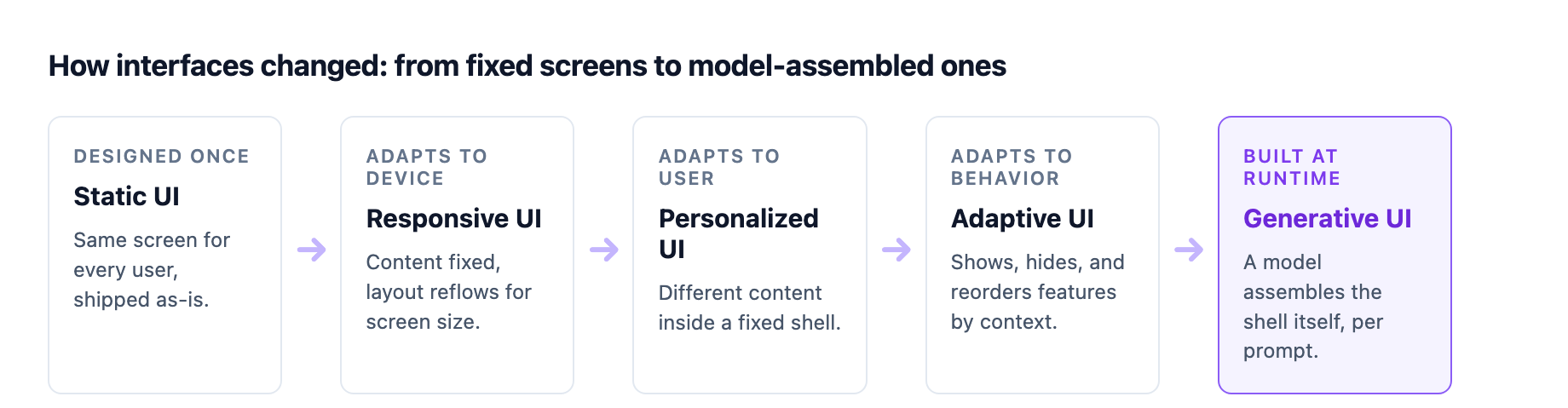
Two things are true here. Most products in the wild today sit between personalized and adaptive. And the biggest AI-native products are already pulling toward generative. ChatGPT Canvas changes shape depending on what you are doing, with a predictable frame around an adaptive working area. Cursor keeps a consistent IDE shell while adapting its contextual panel to your current task. Salesforce's Einstein adapts dashboard layouts to role and usage, so a sales manager sees pipeline metrics front and center while a rep sees activity tracking first3. None of these rebuild the whole product on every request. But each moved a slice of the interface from "designed once" to "composed in the moment."
That is the pattern to internalize: generative UI is not a binary. It is a spectrum of how much of the interface a model composes, and the useful work in 2026 is deciding where each surface of your product belongs.
The Distinction That Keeps Getting Missed
Before going further, separate generative UI from AI-assisted design, because the two are constantly confused3. AI-assisted design is what v0, Lovable, and Bolt do: an AI helps designers and developers produce mockups, components, and code during the creation workflow. The end user never sees the AI; they see whatever shipped. Generative UI is what the end user experiences at runtime: an interface that dynamically rearranges itself around their intent. The first happens before launch, in the build. The second happens after launch, in the product.
The confusion matters because they demand different investments. A team that treats generative UI as "we already use v0, so we are done" has bought the wrong thing. v0 speeds up the design-to-code handoff. Generative UI changes the contract between the product and its user, and it changes what your design system has to be.
Three Patterns, One Control Spectrum
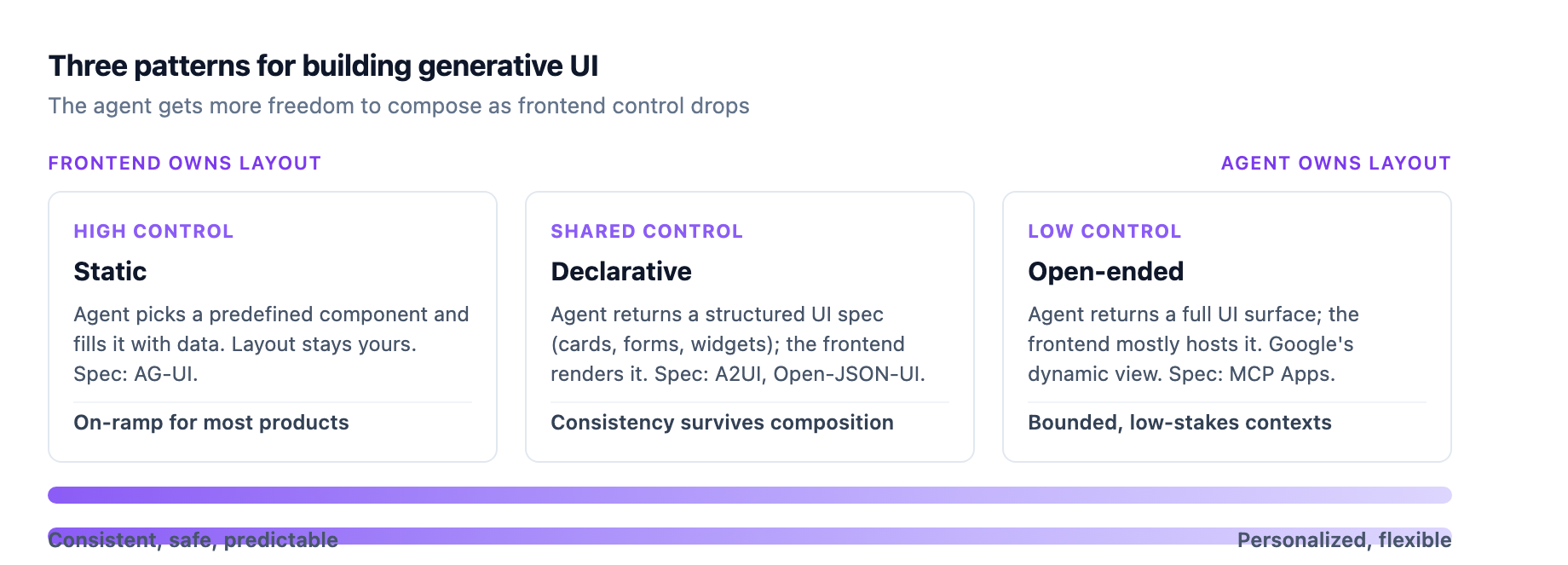
Most practical generative UI implementations fall into one of three patterns, and the difference between them is how much control stays in the frontend versus how much freedom the agent gets4.
Static Generative UI: Highest Control
The frontend owns the layout and interactions. The agent only selects which predefined component to show and fills it with data. CopilotKit implements this with a useFrontendTool hook that binds a built-in component to the lifecycle of an action, so a weather tool renders a styled weather card that reflects loading, executing, and complete states4. The agent streams arguments but never invents UI. This is the safe on-ramp, and for most enterprise products it is the right default: you get the responsiveness of a generated interface without giving up any of your brand or accessibility guarantees.
Declarative Generative UI: Shared Control
The agent returns a structured UI specification, cards, lists, forms, widgets, and the frontend renders it against its own constraints and styling. The two common specs here are Google's A2UI, a JSONL-based declarative format that lets agents return UI widgets as part of their responses, and Open-JSON-UI, an open standardization of OpenAI's internal declarative schema4. A2UI matters because it gives agents a way to render a form or a slider inline in a conversation instead of typing out a request in prose3. The frontend still owns how that spec looks and behaves, so consistency survives, but the agent now composes the structure.
Open-Ended Generative UI: Lowest Control
The agent returns a full UI surface, often embedded or free-form, and the frontend mainly hosts it. This is the pattern behind Google's dynamic view, where the model writes the HTML, CSS, and JavaScript for a complete page1. You get the most personalization and the least consistency. You trade safety, accessibility, and brand control for flexibility, which is why this belongs in bounded, low-stakes contexts and not on your core transactional flows4.
The three patterns are not competing products. They are a ladder you climb as confidence grows, and a map for deciding what each surface of your product needs. A settings page or a checkout should almost certainly sit at the static end. A search result for "explain how RNA polymerase works" is a fine candidate for open-ended.
What This Demands From Your Design System
Here is the part that should concern design-system teams most: generative UI only works when your system is clean enough for a model to compose from. Vercel makes the point bluntly in its guidance on AI-powered prototyping: most design systems are not built to support that kind of reasoning5. A model needs to understand how your components are structured, styled, and related, and most existing systems lack the detail to make that possible.
Vercel's answer is what it calls an AI-native design system, and the requirements are worth stealing even if you never touch v05:
- Open, transparent components. Component libraries that require wrapping, style overrides, or mismatched APIs add abstraction layers the model cannot predict through. Every layer makes the output less consistent, which is why headless UI component libraries, which separate structure from styling, are the closest existing pattern to something a model can consume cleanly.
- Composable, consistent APIs. The architecture has to be predictable so both people and models can work with it.
- Simple, token-based styling. Tokens feed directly into theming, so the model gets a visual baseline and stays on-brand.
The concrete workflow is a registry. shadcn/ui registries let you define and share branded components and blocks in a format models can consume, and they support the Model Context Protocol, so generations stay grounded in your real system across tools like Cursor and Windsurf5. A registry becomes the mechanism by which both humans and machines contextualize a design system.
Supernova, which builds enterprise design-system tooling, pushes the same idea further. Its 2026 outlook argues design systems are evolving from passive repositories into systems an agent can act on, and it centers on two moves: standardize tokens on the Design Tokens Community Group format so any platform can consume them, and make documentation machine-readable so AI coding assistants stay compliant with your standards6. If your system still lives in static PDFs, an agent cannot use it.
The Hard Part: Predictability Versus Personalization
The engineering is the easy half. The design problem is the one nobody has fully solved, and it comes down to trust. Users build mental models of software over time: spatial memory for where the settings button lives, muscle memory for flows they can execute without thinking. That familiarity is efficiency, and it is why an experienced user of any complex tool moves faster than a new one3.
Generative UI, implemented carelessly, destroys it. An interface that looks different every time you open it forces constant relearning. What the system gains in theoretical personalization it loses in practiced fluency. Practitioners on Reddit have been blunt about this, noting that generative UI, like anything generative, is also inconsistent, and that the same prompt does not always reproduce the same interface or workflow3. Users can work around a known limitation. They cannot adapt to unpredictability.
The design principle that threads through the products doing this well is hybrid: anchor users with consistency, serve them with adaptation3. The global structure stays predictable. Navigation, the shell, the high-risk transactional flows, all stay stable and familiar. Inside that stable frame, specific regions, a workspace area, a content panel, a contextual sidebar, adapt dynamically to what the user is doing. This is how you introduce adaptive behavior without breaking the trust people have built with your product. It is also why the control-spectrum framing matters: the static and declarative patterns exist precisely so you can keep the anchor stable while the adaptive regions move.
There is also the question of explanation. When users understand why an interface changed, they tolerate and even appreciate the adaptation. When it changes without explanation, they feel disoriented3. A generative surface needs a reason it can state for how it looks, and a way to return to the version it replaced.
How to Start
If your team wants to move on this, the path is deliberately conservative. Start at the static end of the spectrum. Pick one low-stakes, high-repetition surface, a search interface, an FAQ, a recommendation panel, and let an agent select among your existing components and fill them with data. Measure whether the adaptive version beats the fixed one before you build anything more ambitious4.
Before you scale, make the design system model-readable. Adopt DTCG-standard tokens if you have not, publish a component registry that supports MCP, and make your documentation searchable by a model56. This is the same token-first discipline our earlier guide on token-first design systems covered, now aimed at a machine consumer.
Then decide, surface by surface, where the product should stay fixed and where it may adapt. Keep transactional and high-risk flows stable. Let exploratory and low-stakes surfaces move.
Generative UI is not the end of design systems. It is the reason they matter more. When a model can compose your interface on the fly, the design system stops being a library of finished screens and becomes the constraint set that keeps a model-generated product on-brand, accessible, and trustworthy.
Sources
-
Google Research, "Generative UI: A rich, custom, visual interactive user experience for any prompt" (November 18, 2025). research.google/blog ↩ ↩2 ↩3
-
Leviathan et al., "Generative UI: LLMs are Effective UI Generators" (arXiv 2604.09577). arxiv.org/abs/2604.09577 ↩ ↩2
-
Eleken, "Generative UI: The Shift From Fixed Interfaces to Adaptive Experiences" (updated July 2026). eleken.co ↩ ↩2 ↩3 ↩4 ↩5 ↩6 ↩7 ↩8 ↩9
-
CopilotKit, "The Developer's Guide to Generative UI in 2026" (DEV Community). dev.to ↩ ↩2 ↩3 ↩4 ↩5
-
Vercel, "AI-powered prototyping with design systems." vercel.com/blog ↩ ↩2 ↩3 ↩4
-
Supernova, "The Future of Enterprise Design Systems: 2026 Trends and Tools for Success." supernova.io ↩ ↩2